

LlamaExtract Core Concepts
Overview of the core concepts in LlamaExtract, including extraction agents, data schemas, extraction targets, extraction jobs, and extraction runs.
LlamaExtract is designed to be a flexible and scalable extraction platform. At the core of the platform are the following concepts:
- Extraction Agents: Reusable extractors configured with a specific schema and extraction settings.
- Data Schema: Structured definition for the data you want to extract in JSON/Pydantic format. See detailed explanation below.
- Extraction Target: Defines the scope of extraction and how your schema is applied to documents. See detailed explanation below.
- Extraction Jobs: Asynchronous extraction tasks that involve running an extraction agent on a set of files.
- Extraction Runs: The results of an extraction job including the extracted data and other metadata.
Data Schema
Section titled “Data Schema”The Data Schema defines the structure of the data you want to extract from your documents. It is a JSON Schema that specifies the fields, types, and descriptions for the information you need.
While the schema is fundamentally a JSON Schema (supporting a subset of the full JSON Schema specification), our Python SDK allows you to use Pydantic models for a more Pythonic experience with type validation and IDE support.
How to define your schema
Section titled “How to define your schema”A schema is made of fields. Each field has a name (the key in the output) and a type (string, number, boolean, array, object, etc.). You can also give each field a description.
- Field names — Use clear, stable names that match how you’ll use the data (e.g.
invoice_number,vendor_name). These become the keys in the extracted JSON. - Field descriptions — Descriptions are additional context for the underlying LLM. They are not only for documentation: the model uses them to decide what to extract. Use descriptions to guide the model on what the value for the field should be—for example, what the field means, where it usually appears in the document, acceptable formats, or examples. Better descriptions typically lead to more accurate and consistent extraction.
Extraction Target
Section titled “Extraction Target”The Extraction Target determines how your schema is applied to the document and what granularity of results you receive. This is an important configuration option as it fundamentally changes how data is extracted.
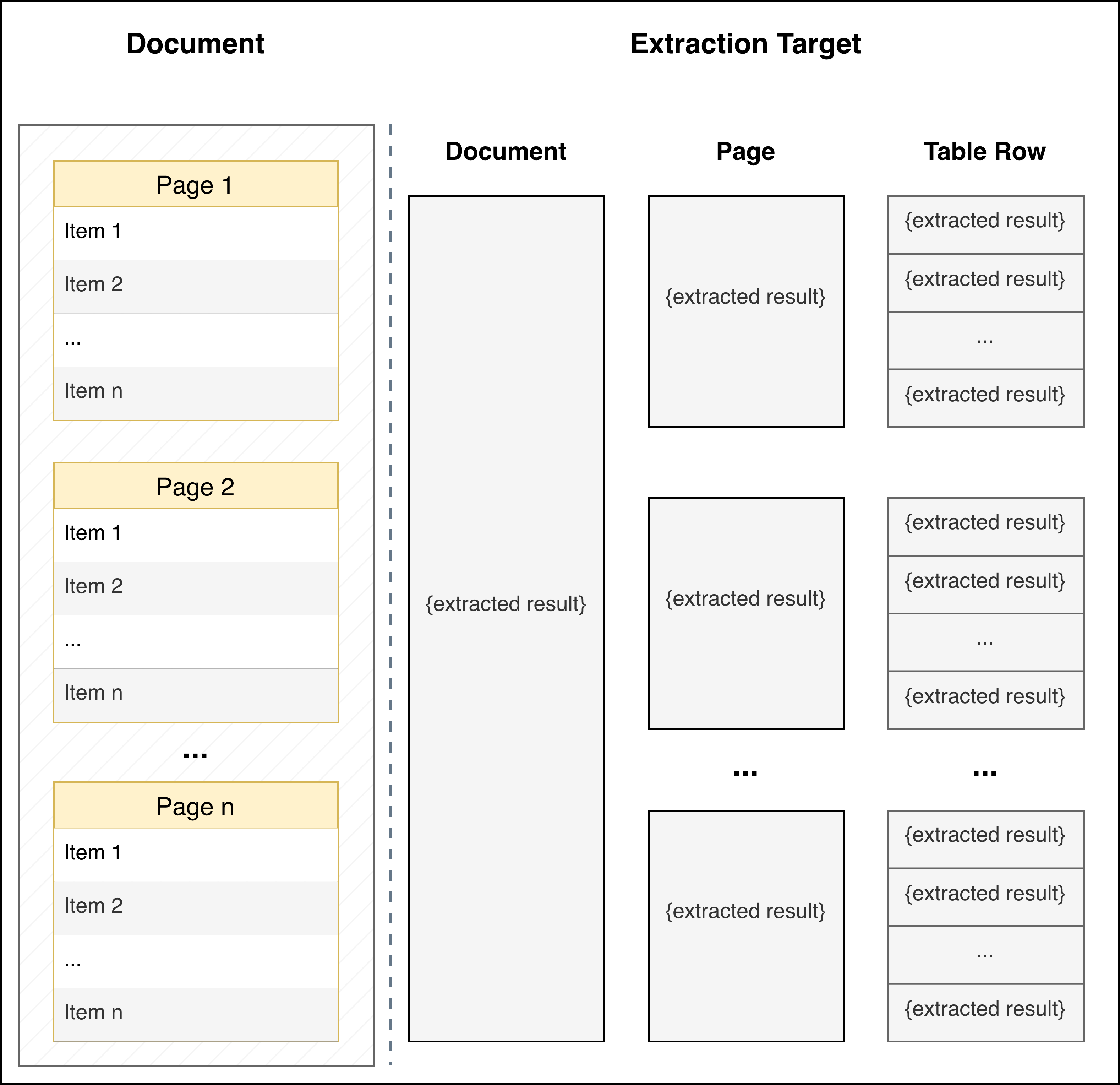
| PER_DOC (Default) | PER_PAGE | PER_TABLE_ROW | |
|---|---|---|---|
| When to Use | Default mode for extracting data from the full document based on your JSON schema | Each page independently contains information about a different entity (e.g., each page contains financial information about a different portfolio company) | Document contains an ordered list of entities (in tables, bulleted/numbered lists, or separated by headers) and you want to extract the same information for each entity |
| How It Works | Schema is applied to the entire document as a single unit | Schema is applied independently to each page of the document | Schema is applied to each identified entity in the document. LlamaExtract automatically detects formatting patterns that distinguish entities (table rows, list items, section headers, etc.) |
| Returns | A single JSON object matching your schema | An array of JSON objects, one per page, each matching your schema | An array of JSON objects, one per entity/row, each matching your schema |
| Example Use Cases | Extracting summary information from a contract, annual report, or research paper | Multi-page forms where each page represents a different entity, or a document with one record per page |
|
| Important Notes | - | Your schema should describe a single entity/page, not a list. Don't use extracted_result: list[template], instead provide the template directly that will be applied at the page level |
|