Logging traces with Opik
For this guide we will be downloading the essays from Paul Graham and use them as our data source. We will then start querying these essays with LlamaIndex and logging the traces to Opik.
Creating an account on Comet.com
Section titled “Creating an account on Comet.com”Comet provides a hosted version of the Opik platform, simply create an account and grab you API Key.
You can also run the Opik platform locally, see the installation guide for more information.
import osimport getpass
if "OPIK_API_KEY" not in os.environ:    os.environ["OPIK_API_KEY"] = getpass.getpass("Opik API Key: ")if "OPIK_WORKSPACE" not in os.environ:    os.environ["OPIK_WORKSPACE"] = input(        "Comet workspace (often the same as your username): "    )
If you are running the Opik platform locally, simply set:
# import os# os.environ["OPIK_URL_OVERRIDE"] = "http://localhost:5173/api"Preparing our environment
Section titled “Preparing our environment”First, we will install the necessary libraries, download the Chinook database and set up our different API keys.
%pip install opik llama-index llama-index-agent-openai llama-index-llms-openai --upgrade --quietAnd configure the required environment variables:
import osimport getpass
if "OPENAI_API_KEY" not in os.environ:    os.environ["OPENAI_API_KEY"] = getpass.getpass(        "Enter your OpenAI API key: "    )
In addition, we will download the Paul Graham essays:
import osimport requests
# Create directory if it doesn't existos.makedirs("./data/paul_graham/", exist_ok=True)
# Download the file using requestsurl = "https://raw.githubusercontent.com/run-llama/llama_index/main/docs/examples/data/paul_graham/paul_graham_essay.txt"response = requests.get(url)with open("./data/paul_graham/paul_graham_essay.txt", "wb") as f:    f.write(response.content)
Using LlamaIndex
Section titled “Using LlamaIndex”Configuring the Opik integration
Section titled “Configuring the Opik integration”You can use the Opik callback directly by calling:
from llama_index.core import set_global_handler
# You should provide your OPIK API key and Workspace using the following environment variables:# OPIK_API_KEY, OPIK_WORKSPACEset_global_handler(    "opik",)
Now that the callback handler is configured, all traces will automatically be logged to Opik.
Using LLamaIndex
Section titled “Using LLamaIndex”The first step is to load the data into LlamaIndex. We will use the SimpleDirectoryReader to load the data from the data/paul_graham directory. We will also create the vector store to index all the loaded documents.
from llama_index.core import VectorStoreIndex, SimpleDirectoryReader
documents = SimpleDirectoryReader("./data/paul_graham").load_data()index = VectorStoreIndex.from_documents(documents)query_engine = index.as_query_engine()
We can now query the index using the query_engine object:
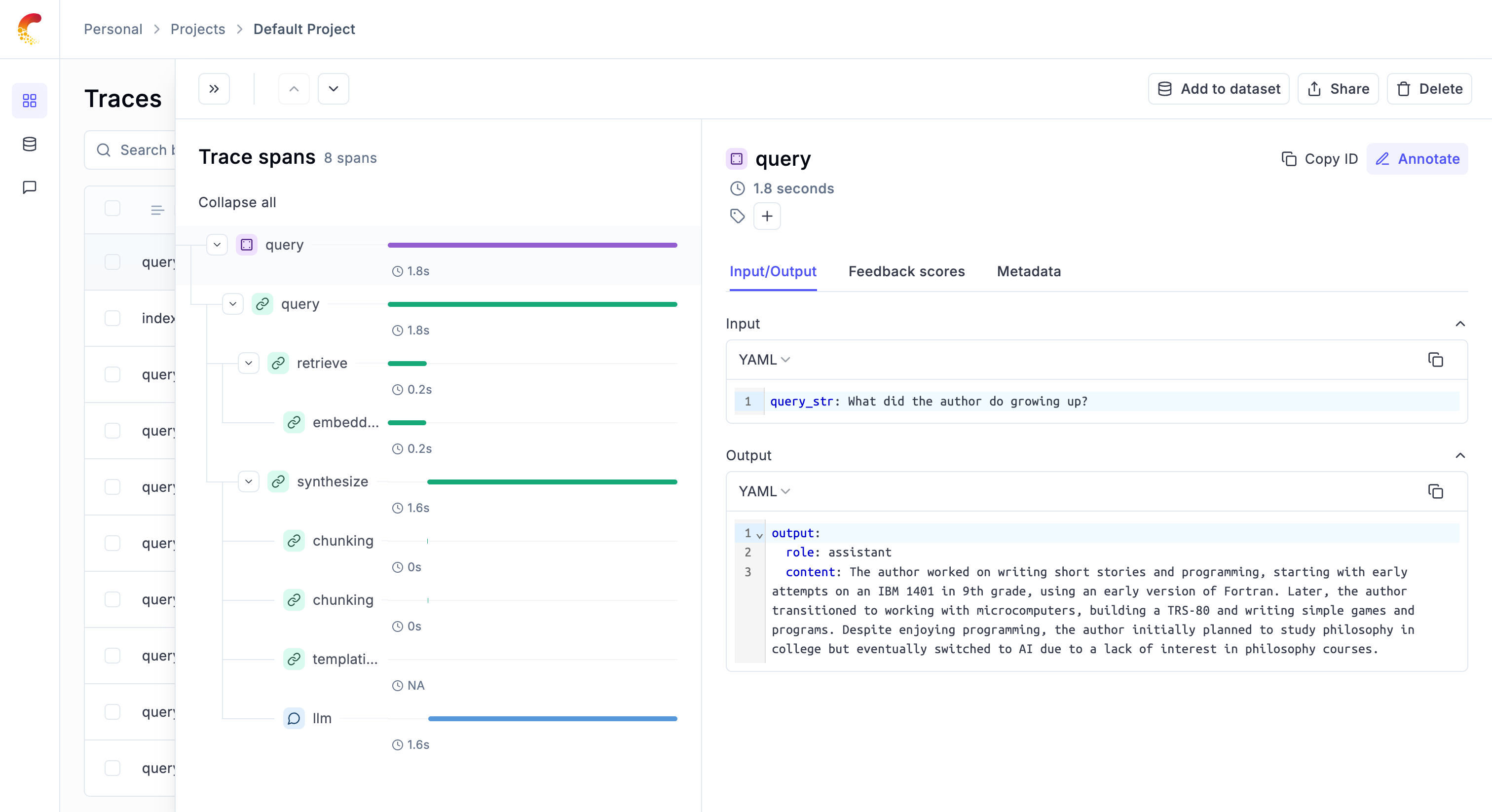
response = query_engine.query("What did the author do growing up?")print(response)You can now go to the Opik app to see the trace: