

Configuring Extract
Everything needed to configure an Extract job in one place — core concepts, schema design and restrictions, configuration options, and performance tips.
This page is the map for an Extract job: the concepts a job is built from, how to write the schema that drives it, every option you can set alongside that schema, and the practices that keep extraction accurate as you scale.
For the field-by-field request reference, see the Extract API Reference. For the extra metadata a job can return, see Metadata Extensions.
Core concepts
Section titled “Core concepts”LlamaExtract is designed to be a flexible and scalable extraction platform. At the core of the platform are the following concepts:
- Extraction Configurations: Reusable settings including schema, tier, and extraction options.
- Data Schema: Structured definition for the data you want to extract in JSON/Pydantic format. See detailed explanation below.
- Extraction Target: Defines the scope of extraction and how your schema is applied to documents. See detailed explanation below.
- Extraction Jobs: Asynchronous tasks that extract structured data from documents using a configuration.
- Extraction Runs: The results of an extraction job including the extracted data and other metadata.
Data schema
Section titled “Data schema”The Data Schema defines the structure of the data you want to extract from your documents. It is a JSON Schema that specifies the fields, types, and descriptions for the information you need.
While the schema is fundamentally a JSON Schema (supporting a subset of the full JSON Schema specification), our Python SDK allows you to use Pydantic models for a more Pythonic experience with type validation and IDE support.
Fields, types, size limits, and the JSON Schema subset that Extract accepts are covered in Schema design and restrictions below.
Extraction target
Section titled “Extraction target”The Extraction Target determines how your schema is applied to the document and what granularity of results you receive. This is an important configuration option as it fundamentally changes how data is extracted.
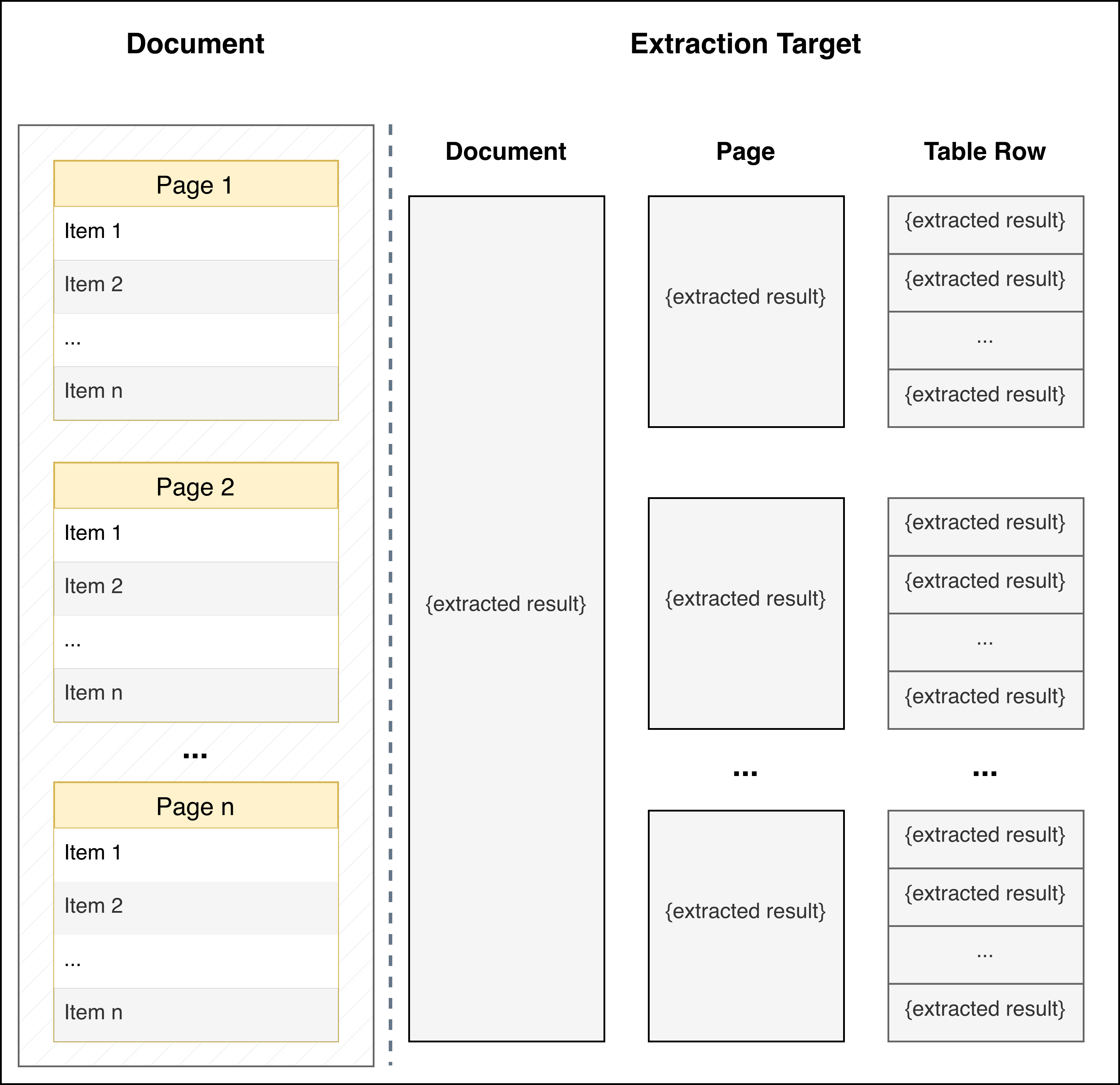
| per_doc (Default) | per_page | per_table_row | |
|---|---|---|---|
| When to Use | Default mode for extracting data from the full document based on your JSON schema | Each page independently contains information about a different entity (e.g., each page contains financial information about a different portfolio company) | Document contains an ordered list of entities (in tables, bulleted/numbered lists, or separated by headers) and you want to extract the same information for each entity |
| How It Works | Schema is applied to the entire document as a single unit | Schema is applied independently to each page of the document | Schema is applied to each identified entity in the document. LlamaExtract automatically detects formatting patterns that distinguish entities (table rows, list items, section headers, etc.) |
| Returns | A single JSON object matching your schema | An array of JSON objects, one per page, each matching your schema | An array of JSON objects, one per entity/row, each matching your schema |
| Example Use Cases | Extracting summary information from a contract, annual report, or research paper | Multi-page forms where each page represents a different entity, or a document with one record per page |
|
| Important Notes | - | Your schema should describe a single entity/page, not a list. Don’t use extracted_result: list[template], instead provide the template directly that will be applied at the page level |
|
Schema design and restrictions
Section titled “Schema design and restrictions”The schema is the most important part of an extraction configuration. It defines the structure of the data you want back, and its field descriptions are what steer the extraction model.
How to define your schema
Section titled “How to define your schema”A schema is made of fields. Each field has a name, a type, and optionally a description.
- Field names — Use clear, stable names that match how you’ll use the data (e.g.
invoice_number,vendor_name). These become the keys in the extracted JSON. - Field descriptions — Descriptions are additional context for the underlying LLM. They are not only for documentation: the extraction model uses them to decide what to extract. Use descriptions to guide the model on what the value for the field could be—for example, what the field means, where it usually appears in the document, acceptable formats, or examples. Better descriptions typically lead to more accurate and consistent extraction.
Required and optional fields
Section titled “Required and optional fields”In JSON Schema, an object’s required array lists the properties that must be present. Listed
properties are required, and unlisted properties are optional. Use "required": [] to make every
property optional. Nullability is separate. Include a null branch when a field may return null.
This schema makes invoice_number required and start_date optional and nullable:
{ "type": "object", "properties": { "invoice_number": { "type": "string" }, "start_date": { "anyOf": [{ "type": "string" }, { "type": "null" }] } }, "required": ["invoice_number"]}You can also write the nullable field as "start_date": { "type": ["string", "null"] }.
Extract accepts both forms. Nullable arrays and objects keep their items and properties.
We recommend specifying required explicitly for correctness. If required is omitted, Extract
treats every property as required for convenience, so you do not have to list every field. This
default differs from standard JSON Schema, where an omitted required array makes all properties
optional.
Schema restrictions
Section titled “Schema restrictions”LlamaExtract only supports a subset of the JSON Schema specification. While limited, it should be sufficient for a wide variety of use-cases.
- An omitted
requiredarray makes every property required in Extract. See Required and optional fields when data may be absent. - In Pydantic, use
Optional[T]orT | Noneto make a field nullable. Set a default ofNoneif the field should also be optional. - Root node must be of type
object. - Schema nesting must be limited to within 7 levels.
- The important fields are key names/titles, type and description. Fields for formatting, default values, etc. are not supported. If you need these, you can add the
restrictions to your field description and/or use a post-processing step. e.g. default values can be supported by making a field optional and then setting
"null"values from the extraction result to the default value. - Additional schema restrictions:
- Maximum properties: 5,000 total properties across the entire schema.
- Maximum total string content: 120,000 characters for all strings (field names, descriptions, enum values, etc.) combined.
- Maximum raw JSON schema size: 150,000 characters for the raw JSON schema string.
- If you hit these limits for complex extraction use cases, consider restructuring your extraction workflow to fit within these constraints, e.g. by extracting subsets of fields and later merging them together.
Schema size
Section titled “Schema size”Cost-effective, Agentic, and Agentic Plus support schemas up to 3,200 fields. The extract rate
increases when a schema grows past 250 fields. Cost-effective and Agentic require version
2026-09-14 or later for large schemas. See pricing for the rates.
Schema size is also a good proxy for how hard an extraction is, so it’s worth knowing how it’s
counted even if you aren’t near the limit.
Size is the number of leaf fields in the schema you submit, meaning the scalar values at the bottom of the tree. It does not depend on the document or on how much data comes back.
- Objects don’t count themselves, only the leaves inside them.
{"address": {"city": ..., "zip": ...}}is 2 fields. - Arrays count their item schema once, no matter how many items get extracted. An array of 40 line items with 5 fields each counts as 5 fields, not 200.
- An array of scalars, e.g.
{"tags": ["string"]}, counts as 1 field. $refis expanded at each place it’s used. If three fields all point at the same 10-fieldAddressdefinition, that’s 30 fields, not 10. Reusing a definition keeps your schema readable but doesn’t make it smaller.
So a schema with 30 top-level scalars and a table of 10 columns is 40 fields, well under the point where the multiplier starts.
Tips & best practices
Section titled “Tips & best practices”- Try to limit schema nesting to 3-4 levels.
- Make fields optional when data might not always be present (specially
booleanandintfields where defaults for missing values could cause confusion). - When you want to extract a variable number of entities, use an
arraytype. However, note that you cannot use anarraytype for the root node. - Use descriptive field names and detailed descriptions. Use descriptions to pass formatting instructions or few-shot examples.
- Above all, start simple and iteratively build your schema to incorporate requirements.
Automatic schema generation
Section titled “Automatic schema generation”Instead of manually defining schemas, you can use LlamaExtract’s automatic schema generation feature. The system can generate a schema based on:
- A natural language prompt: Describe what data you want to extract
- A sample file: Upload a document and let the system infer the schema from its structure
- An existing schema to refine: Provide a base schema and let the system improve or extend it
You can combine these inputs — for example, provide both a sample file and a prompt to guide the generation.
Using the REST API
Section titled “Using the REST API”curl -X 'POST' \ 'https://api.cloud.llamaindex.ai/api/v2/extract/schema/generate?project_id={PROJECT_ID}' \ -H 'accept: application/json' \ -H "Authorization: Bearer $LLAMA_CLOUD_API_KEY" \ -H 'Content-Type: application/json' \ -d '{ "prompt": "Extract invoice details including invoice number, date, vendor name, line items with descriptions and amounts, and total amount", "file_id": "optional-file-id-for-sample-document" }'For the full API documentation, see the LlamaExtract API Reference.
Defining schemas with SDKs
Section titled “Defining schemas with SDKs”The Python SDK can be installed using
pip install llama-cloud>=2.1Schemas can be defined using either Pydantic models or JSON Schema:
Using Pydantic (recommended)
Section titled “Using Pydantic (recommended)”from pydantic import BaseModel, Fieldfrom typing import List, Optional
class Experience(BaseModel): company: str = Field(description="Company name") title: str = Field(description="Job title") start_date: Optional[str] = Field(description="Start date of employment") end_date: Optional[str] = Field(description="End date of employment")
class Resume(BaseModel): name: str = Field(description="Candidate name") experience: List[Experience] = Field(description="Work history")
schema = Resume.model_json_schema()Using JSON Schema
Section titled “Using JSON Schema”schema = { "type": "object", "properties": { "name": {"type": "string", "description": "Candidate name"}, "experience": { "type": "array", "description": "Work history", "items": { "type": "object", "properties": { "company": { "type": "string", "description": "Company name", }, "title": {"type": "string", "description": "Job title"}, "start_date": { "anyOf": [{"type": "string"}, {"type": "null"}], "description": "Start date of employment", }, "end_date": { "anyOf": [{"type": "string"}, {"type": "null"}], "description": "End date of employment", }, }, }, }, },}With your schema, you can directly run extractions using the SDK:
from llama_cloud import LlamaCloud
client = LlamaCloud(api_key="your_api_key")
file_obj = client.files.create(file="path/to/your/document.pdf", purpose="extract")
job = client.extract.create(    file_input=file_obj.id,    configuration={            "data_schema": schema,            "tier": "agentic",        },)
# Poll for completionwhile job.status not in ("COMPLETED", "FAILED", "CANCELLED"):    import time; time.sleep(2)    job = client.extract.get(job.id)
The TypeScript SDK can be installed using
npm install @llamaindex/llama-cloud zodSchemas can be defined using either Zod models or JSON Schema:
Using Zod (recommended)
Section titled “Using Zod (recommended)”import { z } from "zod";
const ExperienceSchema = z.object({ company: z.string().describe("Company name"), title: z.string().describe("Job title"), start_date: z.string().nullable().describe("Start date of employment"), end_date: z.string().nullable().describe("End date of employment"),});
const ResumeSchema = z.object({ name: z.string().describe("Candidate name"), experience: z.array(ExperienceSchema).describe("Work history"),});
const schema = z.toJSONSchema(ResumeSchema);Using JSON Schema
Section titled “Using JSON Schema”const schema = { type: "object", properties: { name: { type: "string", description: "Candidate name" }, experience: { type: "array", description: "Work history", items: { type: "object", properties: { company: { type: "string", description: "Company name", }, title: { type: "string", description: "Job title" }, start_date: { anyOf: [{ type: "string" }, { type: "null" }], description: "Start date of employment", }, end_date: { anyOf: [{ type: "string" }, { type: "null" }], description: "End date of employment", }, }, }, }, },};With your schema, you can directly run extractions using the SDK:
import fs from 'fs';import LlamaCloud from '@llamaindex/llama-cloud';
const client = new LlamaCloud({  apiKey: 'your_api_key',});
const fileObj = await client.files.create({  file: fs.createReadStream('path/to/your/document.pdf'),  purpose: 'extract',});
let job = await client.extract.create({  file_input: fileObj.id,  configuration: {      data_schema: schema,      tier: 'agentic',    },});
// Poll for completionwhile (!['COMPLETED', 'FAILED', 'CANCELLED'].includes(job.status)) {  await new Promise((r) => setTimeout(r, 2000));  job = await client.extract.get(job.id);}
The Go SDK can be installed using
go get github.com/run-llama/llama-parse-goThe Go SDK has no Pydantic/Zod analogue — define your schema as a raw JSON Schema literal, then run an extraction with it:
package main
import (  "context"  "fmt"  "log"  "os"  "time"
  llamacloud "github.com/run-llama/llama-parse-go")
func main() {  ctx := context.Background()  client := llamacloud.NewClient()
  // Define the schema as a JSON Schema literal  dataSchema := map[string]*llamacloud.ExtractConfigurationDataSchemaUnionParam{    "type": {OfString: llamacloud.String("object")},    "properties": {OfAnyMap: map[string]any{      "name": map[string]any{"type": "string", "description": "Candidate name"},      "experience": map[string]any{        "type":        "array",        "description": "Work history",        "items": map[string]any{          "type": "object",          "properties": map[string]any{            "company": map[string]any{"type": "string", "description": "Company name"},            "title":   map[string]any{"type": "string", "description": "Job title"},            "start_date": map[string]any{              "anyOf":       []any{map[string]any{"type": "string"}, map[string]any{"type": "null"}},              "description": "Start date of employment",            },            "end_date": map[string]any{              "anyOf":       []any{map[string]any{"type": "string"}, map[string]any{"type": "null"}},              "description": "End date of employment",            },          },        },      },    }},  }
  // Upload a file to extract from  f, err := os.Open("document.pdf")  if err != nil {    log.Fatal(err)  }  defer f.Close()
  fileObj, err := client.Files.New(ctx, llamacloud.FileNewParams{    File:    f,    Purpose: "extract",  })  if err != nil {    log.Fatal(err)  }
  // Extract data from document  job, err := client.Extract.New(ctx, llamacloud.ExtractNewParams{    ExtractV2JobCreate: llamacloud.ExtractV2JobCreateParam{      FileInput: fileObj.ID,      Configuration: llamacloud.ExtractConfigurationParam{        DataSchema: dataSchema,        Tier:       llamacloud.ExtractConfigurationTierAgentic,      },    },  })  if err != nil {    log.Fatal(err)  }
  // Poll for completion  for job.Status != "COMPLETED" && job.Status != "FAILED" && job.Status != "CANCELLED" {    time.Sleep(2 * time.Second)    job, err = client.Extract.Get(ctx, job.ID, llamacloud.ExtractGetParams{})    if err != nil {      log.Fatal(err)    }  }
  fmt.Println(job.ExtractResult.RawJSON())}
The Java SDK can be installed using
implementation("ai.llamaindex:llama-cloud:1.3.0")The Java SDK has no Pydantic/Zod analogue — define your schema as a raw JSON Schema literal, then run an extraction with it:
import ai.llamaindex.llamacloud.client.LlamaCloudClient;import ai.llamaindex.llamacloud.client.okhttp.LlamaCloudOkHttpClient;import ai.llamaindex.llamacloud.core.JsonValue;import ai.llamaindex.llamacloud.models.extract.ExtractConfiguration;import ai.llamaindex.llamacloud.models.extract.ExtractCreateParams;import ai.llamaindex.llamacloud.models.extract.ExtractGetParams;import ai.llamaindex.llamacloud.models.extract.ExtractV2Job;import ai.llamaindex.llamacloud.models.extract.ExtractV2JobCreate;import ai.llamaindex.llamacloud.models.files.FileCreateParams;import ai.llamaindex.llamacloud.models.files.FileCreateResponse;import java.nio.file.Paths;import java.util.List;import java.util.Map;
LlamaCloudClient client = LlamaCloudOkHttpClient.fromEnv();
// Define the schema as a JSON Schema literalExtractConfiguration.DataSchema dataSchema = ExtractConfiguration.DataSchema.builder()        .putAdditionalProperty("type", JsonValue.from("object"))        .putAdditionalProperty("properties", JsonValue.from(Map.of(                "name", Map.of("type", "string", "description", "Candidate name"),                "experience", Map.of(                        "type", "array",                        "description", "Work history",                        "items", Map.of(                                "type", "object",                                "properties", Map.of(                                        "company", Map.of("type", "string", "description", "Company name"),                                        "title", Map.of("type", "string", "description", "Job title"),                                        "start_date", Map.of(                                                "anyOf", List.of(Map.of("type", "string"), Map.of("type", "null")),                                                "description", "Start date of employment"),                                        "end_date", Map.of(                                                "anyOf", List.of(Map.of("type", "string"), Map.of("type", "null")),                                                "description", "End date of employment")))))))        .build();
// Upload a file to extract fromFileCreateResponse fileObj = client.files().create(        FileCreateParams.builder()                .file(Paths.get("document.pdf"))                .purpose("extract")                .build());
// Extract data from documentExtractV2Job job = client.extract().create(        ExtractCreateParams.builder()                .extractV2JobCreate(                        ExtractV2JobCreate.builder()                                .fileInput(fileObj.id())                                .configuration(                                        ExtractConfiguration.builder()                                                .dataSchema(dataSchema)                                                .tier(ExtractConfiguration.Tier.AGENTIC)                                                .build())                                .build())                .build());
// Poll for completionwhile (!job.status().equals("COMPLETED")        && !job.status().equals("FAILED")        && !job.status().equals("CANCELLED")) {    Thread.sleep(2000);    job = client.extract().get(ExtractGetParams.builder().jobId(job.id()).build());}
System.out.println(job.extractResult());
The CLI can be installed using
go install github.com/run-llama/llama-parse-cli/cmd/llp@latestThe CLI has no Pydantic/Zod analogue — define your schema as a raw JSON Schema literal, then run an extraction with it:
# Define the schema as a JSON Schema literalDATA_SCHEMA='{  "type": "object",  "properties": {    "name": {"type": "string", "description": "Candidate name"},    "experience": {      "type": "array",      "description": "Work history",      "items": {        "type": "object",        "properties": {          "company": {"type": "string", "description": "Company name"},          "title": {"type": "string", "description": "Job title"},          "start_date": {"anyOf": [{"type": "string"}, {"type": "null"}], "description": "Start date of employment"},          "end_date": {"anyOf": [{"type": "string"}, {"type": "null"}], "description": "End date of employment"}        }      }    }  }}'
# Upload a file to extract fromFILE_ID=$(llp files create --file document.pdf --purpose extract | jq -r '.id')
# Extract data from documentJOB_ID=$(llp extract create \  --file-input "$FILE_ID" \  --configuration "{\"data_schema\": $DATA_SCHEMA, \"tier\": \"agentic\"}" \  | jq -r '.id')
# Poll for completionwhile true; do  JOB=$(llp extract get --job-id "$JOB_ID")  STATUS=$(echo "$JOB" | jq -r '.status')  case "$STATUS" in COMPLETED|FAILED|CANCELLED) break ;; esac  sleep 2done
echo "$JOB" | jq '.extract_result'
Configuration options
Section titled “Configuration options”The schema decides what comes back. The options below decide how the job runs — which tier interprets the document, which pages it reads, and what extra metadata it returns. The extraction target belongs to this group too; it is described above because it changes the shape of your results, not just their quality.
Extract tiers determine how much effort LlamaExtract puts into producing structured data from a document.
Agentic Plus provides the highest extraction quality across document types, including short or straightforward documents. Use it when you want the best result and can accept higher cost and latency. It may take longer on long or complex documents as it puts more iterative effort into the result.
Agentic balances quality, cost, and latency across a broad range of documents, including mixed layouts and tables.
Cost Effective prioritizes lower cost and latency for straightforward extraction, especially at high volume. It works best when fields and layouts are predictable and ambiguity is limited.
Cost-effective, Agentic, and Agentic Plus support schemas up to 3,200 fields. Schemas above 250 fields use a higher extract rate. See pricing for the schema-size rates and version requirements.
Turbo is the speed tier. It prepares the document itself rather than running a separate Parse step, which is what makes it fast and also means it produces no parse output: there is no parsed text or Markdown to retrieve from a Turbo job, only the structured result your schema asks for.
Latency is the reason to choose Turbo. On the short documents it targets, it typically returns in seconds where the other tiers take tens of seconds. On our extraction benchmark it scores above Cost Effective on accuracy; choose an Agentic tier when maximum accuracy is what matters. Turbo bills one all-in per-page rate with no separate parse charge, and that rate is higher than Agentic: it is a premium option that pays for speed, not a cheaper one — see pricing.
Reach for Turbo when latency is user-facing, such as interactive apps and upload-and-review flows, or when you run high volumes of short, predictable documents.
Turbo carries real constraints:
| Capability | Turbo |
|---|---|
| Input formats | PDF, JPG, PNG only |
| Extraction target | per_doc only; per_page and per_table_row are rejected |
| Parse | No parse step and no parse output; parse_tier and parse_config_id are ignored if sent |
| Citations | Supported, text-level only; granular bounding boxes are rejected |
| Confidence scores | Supported |
Each extract tier has a default parse tier chosen to balance cost and quality. You can override the parse tier in Advanced Settings when your workload needs lower parsing cost or higher-quality document interpretation. Turbo is the exception: it runs without a parse step, so there is no parse tier to override. See pricing for the default combinations and additive costs.
Versions
Section titled “Versions”All tiers use the same version convention. Use latest while evaluating changes, then pin the resolved date in production. latest selects the newest version compatible with the requested options, while a date selects the newest release for that tier on or before the date.
Spreadsheet mode
Section titled “Spreadsheet mode”Spreadsheet mode (spreadsheet_mode) extracts directly from an Excel or CSV workbook (.xlsx, .xls, .csv), working with its cells rather than flattening the file into text. It runs on the cost_effective, agentic, and agentic_plus tiers and does not produce citations or confidence scores. Cost-effective and Agentic require version 2026-09-14 or later. Spreadsheet mode bills by workbook size at the selected tier’s extract rate, with no separate Parse charge. See Extraction pricing.
Reach for it when a workbook holds structured, predictably shaped data you want mapped onto a schema — positions in a fund workbook, line items in an exported ledger. Turn it on with spreadsheet_mode and, optionally, sheet_names to limit extraction to specific worksheets (names match exactly; omit for every sheet; on spreadsheets sheet_names replaces target_pages):
from pydantic import BaseModel, Field
class Position(BaseModel):    ticker: str = Field(description="Ticker or symbol")    market_value: float = Field(description="Position market value")
class Portfolio(BaseModel):    positions: list[Position] = Field(description="One entry per holding in the workbook")
job = client.extract.create(    file_input=file_obj.id,   # an uploaded .xlsx / .xls / .csv    configuration={        "data_schema": Portfolio.model_json_schema(),        "tier": "agentic",        "spreadsheet_mode": True,        "sheet_names": ["Holdings"],  # optional; omit for every sheet    },)
When you don’t know a workbook’s shape ahead of time, extract every cell into a generic “tidy cell” schema — each cell carrying its row- and column-header path — instead of a targeted one:
class Cell(BaseModel):    row_hierarchy: list[str | None]     # row-label path to this cell    column_hierarchy: list[str | None]  # column-header path above it    value: str | None
class Table(BaseModel):    title: str    cells: list[Cell]
class Workbook(BaseModel):    tables: list[Table]
Advanced settings
Section titled “Advanced settings”Under Advanced Settings in the UI you can fine-tune how extraction runs:
- Parse tier: Select the parsing tier used to interpret the input document before extraction. This uses the same v2 parse tiers as LlamaParse (for example,
cost_effective,agentic, andagentic_plus). See Tiers for details. Not applicable on Turbo, which runs without a parse step. - Cite sources: Enable cite sources to attach citations to extracted fields so you can trace every value back to its origin in the document. On Turbo, citations are text-level and carry no bounding boxes.
- Confidence scores: Enable confidence scores to get per-field confidence signals alongside extracted output.
- System prompt: Provide a system prompt to globally guide the extractor (for example, “Prefer the most recent fiscal year if multiple are present”, or “Return numbers as plain numerals without currency symbols”).
System prompt
Section titled “System prompt”- System Prompt: Any additional system level instructions for the extraction. Note that you should use the schema descriptions to pass field-level instructions, few-shot examples, formatting instructions, etc.
Page range and context window
Section titled “Page range and context window”-
Page Range: Specify which pages to extract from by providing comma-separated page numbers or ranges (1-based indexing). For example, use
1,3,5-7,9to extract pages 1, 3, pages 5 through 7, and page 9. You can also use ranges like1-3,8-10to extract the first three pages and pages 8 through 10. Page numbers are 1-based, meaning the first page is page 1. This option is useful when you only need to extract data from specific sections of large documents. -
Context Window: Number of pages to pass as context for long document extraction. This is useful when extracting from large documents where you need context from surrounding pages. This is configurable via the extraction tier and system prompt. Larger values keep more of the surrounding document intact, which helps when you need to see multi-page tables or invoices in one pass. Smaller values advance through the file more aggressively and are better when you need exhaustive coverage of dense lists.
Metadata extensions
Section titled “Metadata extensions”For additional extraction features that provide enhanced metadata and insights, see the Metadata Extensions page which covers:
- Citations: Source tracing for extracted fields
- Confidence Scores: Quantitative confidence measures
These extensions return additional metadata in the extract_metadata field but may impact processing time.
Setting configuration options
Section titled “Setting configuration options”You can configure these options when creating an extraction job using either the REST API or Python SDK.
First, install the Python SDK:
pip install llama-cloud>=2.1Here’s how to set various configuration options:
import timefrom llama_cloud import LlamaCloud, AsyncLlamaCloud
client = LlamaCloud(api_key="your_api_key")
schema = {    "type": "object",    "properties": {        "company_name": {"type": "string", "description": "Name of the company"},        "revenue": {"type": "number", "description": "Annual revenue in USD"}    }}
file_obj = client.files.create(file="path/to/your/document.pdf", purpose="extract")file_id = file_obj.id
job = client.extract.create(    file_input=file_id,    configuration={        "data_schema": schema,        "extraction_target": "per_doc",          # per_doc, per_page, per_table_row        "tier": "agentic",                       # cost_effective, agentic, agentic_plus        "version": "2026-03-31",                 # Pin behavior to the latest release available on this date        "system_prompt": "Focus on the most recent financial data",        "target_pages": "1-5,10-15",             # Extract from specific pages        "cite_sources": True,                    # Enable citations        "confidence_scores": True,               # Enable confidence scores    },)
# Poll for completionwhile job.status not in ("COMPLETED", "FAILED", "CANCELLED"):    time.sleep(2)    job = client.extract.get(job.id)
First, install the TypeScript SDK:
npm install @llamaindex/llama-cloud zodHere’s how to set various configuration options:
import fs from 'fs';import LlamaCloud from '@llamaindex/llama-cloud';
const client = new LlamaCloud({  apiKey: 'your_api_key',});
const schema = {  type: 'object',  properties: {    company_name: { type: 'string', description: 'Name of the company' },    revenue: { type: 'number', description: 'Annual revenue in USD' },  },};
const fileObj = await client.files.create({  file: fs.createReadStream('path/to/your/document.pdf'),  purpose: 'extract',});const fileId = fileObj.id;
let job = await client.extract.create({  file_input: fileId,  configuration: {      data_schema: schema,      extraction_target: 'per_doc',           // per_doc, per_page, per_table_row      tier: 'agentic',                       // cost_effective, agentic, agentic_plus      version: '2026-03-31',                 // Pin behavior to the latest release available on this date      system_prompt: 'Focus on the most recent financial data',      target_pages: '1-5,10-15',             // Extract from specific pages      cite_sources: true,                    // Enable citations      confidence_scores: true,               // Enable confidence scores    },});
// Poll for completionwhile (!['COMPLETED', 'FAILED', 'CANCELLED'].includes(job.status)) {  await new Promise((r) => setTimeout(r, 2000));  job = await client.extract.get(job.id);}
First, install the Go SDK:
go get github.com/run-llama/llama-parse-goHere’s how to set various configuration options:
package main
import (    "context"    "fmt"    "log"    "os"    "time"
    llamacloud "github.com/run-llama/llama-parse-go")
func main() {    ctx := context.Background()    client := llamacloud.NewClient()
    // Define schema as a JSON Schema literal    dataSchema := map[string]*llamacloud.ExtractConfigurationDataSchemaUnionParam{        "type": {OfString: llamacloud.String("object")},        "properties": {OfAnyMap: map[string]any{            "company_name": map[string]any{"type": "string", "description": "Name of the company"},            "revenue":      map[string]any{"type": "number", "description": "Annual revenue in USD"},        }},    }
    f, err := os.Open("path/to/your/document.pdf")    if err != nil {        log.Fatal(err)    }    defer f.Close()
    fileObj, err := client.Files.New(ctx, llamacloud.FileNewParams{        File:    f,        Purpose: "extract",    })    if err != nil {        log.Fatal(err)    }
    job, err := client.Extract.New(ctx, llamacloud.ExtractNewParams{        ExtractV2JobCreate: llamacloud.ExtractV2JobCreateParam{            FileInput: fileObj.ID,            Configuration: llamacloud.ExtractConfigurationParam{                DataSchema:       dataSchema,                ExtractionTarget: llamacloud.ExtractConfigurationExtractionTargetPerDoc, // per_doc, per_page, per_table_row                Tier:             llamacloud.ExtractConfigurationTierAgentic,             // cost_effective, agentic                Version:          llamacloud.String("2026-03-31"),                        // Pin behavior to the latest release available on this date                SystemPrompt:     llamacloud.String("Focus on the most recent financial data"),                TargetPages:      llamacloud.String("1-5,10-15"),                         // Extract from specific pages                CiteSources:      llamacloud.Bool(true),                                  // Enable citations                ConfidenceScores: llamacloud.Bool(true),                                  // Enable confidence scores            },        },    })    if err != nil {        log.Fatal(err)    }
    // Poll for completion    for job.Status != "COMPLETED" && job.Status != "FAILED" && job.Status != "CANCELLED" {        time.Sleep(2 * time.Second)        job, err = client.Extract.Get(ctx, job.ID, llamacloud.ExtractGetParams{})        if err != nil {            log.Fatal(err)        }    }
    fmt.Println(job.ExtractResult.RawJSON())}
First, install the Java SDK:
implementation("ai.llamaindex:llama-cloud:1.3.0")Here’s how to set various configuration options:
import ai.llamaindex.llamacloud.client.LlamaCloudClient;import ai.llamaindex.llamacloud.client.okhttp.LlamaCloudOkHttpClient;import ai.llamaindex.llamacloud.core.JsonValue;import ai.llamaindex.llamacloud.models.extract.ExtractConfiguration;import ai.llamaindex.llamacloud.models.extract.ExtractCreateParams;import ai.llamaindex.llamacloud.models.extract.ExtractGetParams;import ai.llamaindex.llamacloud.models.extract.ExtractV2Job;import ai.llamaindex.llamacloud.models.extract.ExtractV2JobCreate;import ai.llamaindex.llamacloud.models.files.FileCreateParams;import ai.llamaindex.llamacloud.models.files.FileCreateResponse;import java.nio.file.Paths;import java.util.HashMap;import java.util.Map;
LlamaCloudClient client = LlamaCloudOkHttpClient.fromEnv();
// Define schema as a JSON Schema literalMap<String, Object> companyNameField = new HashMap<>();companyNameField.put("type", "string");companyNameField.put("description", "Name of the company");
Map<String, Object> revenueField = new HashMap<>();revenueField.put("type", "number");revenueField.put("description", "Annual revenue in USD");
Map<String, Object> properties = new HashMap<>();properties.put("company_name", companyNameField);properties.put("revenue", revenueField);
ExtractConfiguration.DataSchema dataSchema = ExtractConfiguration.DataSchema.builder()        .putAdditionalProperty("type", JsonValue.from("object"))        .putAdditionalProperty("properties", JsonValue.from(properties))        .build();
// Upload a file to extract fromFileCreateResponse fileObj = client.files().create(        FileCreateParams.builder()                .file(Paths.get("path/to/your/document.pdf"))                .purpose("extract")                .build());
ExtractV2Job job = client.extract().create(        ExtractCreateParams.builder()                .extractV2JobCreate(                        ExtractV2JobCreate.builder()                                .fileInput(fileObj.id())                                .configuration(                                        ExtractConfiguration.builder()                                                .dataSchema(dataSchema)                                                .extractionTarget(ExtractConfiguration.ExtractionTarget.PER_DOC)                                                .tier(ExtractConfiguration.Tier.AGENTIC)                                                .version("2026-03-31")                                                .systemPrompt("Focus on the most recent financial data")                                                .targetPages("1-5,10-15")                                                .citeSources(true)                                                .confidenceScores(true)                                                .build())                                .build())                .build());
// Poll for completionwhile (!job.status().equals("COMPLETED")        && !job.status().equals("FAILED")        && !job.status().equals("CANCELLED")) {    Thread.sleep(2000);    job = client.extract().get(ExtractGetParams.builder().jobId(job.id()).build());}
System.out.println(job.extractResult());
First, install the CLI:
go install github.com/run-llama/llama-parse-cli/cmd/llp@latestHere’s how to set various configuration options:
# Define schema as a JSON Schema literalDATA_SCHEMA='{  "type": "object",  "properties": {    "company_name": {"type": "string", "description": "Name of the company"},    "revenue": {"type": "number", "description": "Annual revenue in USD"}  }}'
# Upload a file to extract fromFILE_ID=$(llp files create --file path/to/your/document.pdf --purpose extract | jq -r '.id')
# Set various configuration optionsJOB_ID=$(llp extract create \  --file-input "$FILE_ID" \  --configuration "{\"data_schema\": $DATA_SCHEMA, \"extraction_target\": \"per_doc\", \"tier\": \"agentic\", \"version\": \"2026-03-31\", \"system_prompt\": \"Focus on the most recent financial data\", \"target_pages\": \"1-5,10-15\", \"cite_sources\": true, \"confidence_scores\": true}" \  | jq -r '.id')
# Poll for completionwhile true; do  JOB=$(llp extract get --job-id "$JOB_ID")  STATUS=$(echo "$JOB" | jq -r '.status')  case "$STATUS" in COMPLETED|FAILED|CANCELLED) break ;; esac  sleep 2done
echo "$JOB" | jq '.extract_result'
REST API
Section titled “REST API”You can configure these options using the REST API when creating an extraction job:
curl -X 'POST' \ 'https://api.cloud.llamaindex.ai/api/v2/extract?project_id={PROJECT_ID}' \ -H 'accept: application/json' \ -H "Authorization: Bearer $LLAMA_CLOUD_API_KEY" \ -H 'Content-Type: application/json' \ -d '{ "file_input": "{FILE_ID}", "configuration": { "data_schema": { "type": "object", "properties": { "company_name": {"type": "string", "description": "Name of the company"}, "revenue": {"type": "number", "description": "Annual revenue in USD"} } }, "extraction_target": "per_doc", "tier": "agentic", "version": "2026-03-31", "system_prompt": "Focus on the most recent financial data", "target_pages": "1-5,10-15", "cite_sources": true, "confidence_scores": true } }'Configuration reference
Section titled “Configuration reference”| Option | Type | Default | Description |
|---|---|---|---|
| Schema Alignment | |||
extraction_target | string | ”per_doc” | Extraction scope: per_doc, per_page, per_table_row. Agentic Plus supports per_doc only. |
| Tier | |||
tier | string | ”agentic” | Extraction tier: cost_effective, agentic (default), agentic_plus. turbo is also accepted — see Tiers for its constraints. |
version | string | ”latest” | Extract algorithm version. Use “latest” during development or pin to a date in YYYY-MM-DD format for stable production behavior. Applies to every tier, including turbo. |
| System Prompt | |||
system_prompt | string | null | Additional system-level instructions |
| Page Range and Context | |||
target_pages | string | null | Comma-separated page numbers or ranges to process (1-based, e.g., “1,3,5-7”). Pages are processed in the order listed, so “3,1,2” feeds page 3 first, then 1, then 2. |
max_pages | integer | null | Maximum number of pages to process |
| Metadata Extensions | |||
cite_sources | boolean | false | Enable source citations |
confidence_scores | boolean | false | Enable confidence scores |
| Spreadsheet | |||
spreadsheet_mode | boolean | false | Extract directly from an Excel/CSV workbook by reading its cells. Supported on cost_effective, agentic, and agentic_plus; Cost-effective and Agentic require version 2026-09-14 or later. No citations or confidence scores. See pricing. |
sheet_names | array | null | Worksheet names to extract when spreadsheet_mode is on (case-sensitive, exact match). Overrides target_pages; omit to extract every sheet. |
Performance tips
Section titled “Performance tips”Overall best practices
Section titled “Overall best practices”For maximum extraction success:
-
Start with the agentic tier for debugging: When troubleshooting extraction issues, use the
agentictier which uses the most capable models. If extraction succeeds withagentic, you can trycost_effectiveto see if quality holds for your use case. If extraction fails even withagentic, the issue is likely in your schema design (e.g., ambiguous field descriptions). If wall-clock latency is your constraint rather than quality, see the Turbo tier: it extracts pages in parallel with no parse step and returns in seconds on PDF and image inputs.import timefrom llama_cloud import LlamaCloudclient = LlamaCloud(api_key="your_api_key")schema = {"type": "object","properties": {"company_name": {"type": "string", "description": "Name of the company"},"revenue": {"type": "number", "description": "Annual revenue in USD"},},}file_obj = client.files.create(file="path/to/your/document.pdf", purpose="extract")# Start debugging with agentic tierjob = client.extract.create(file_input=file_obj.id,configuration={"data_schema": schema,"extraction_target": "per_doc","tier": "agentic",},)# Poll for completionwhile job.status not in ("COMPLETED", "FAILED", "CANCELLED"):time.sleep(2)job = client.extract.get(job.id)print(job.extract_result)import fs from 'fs';import LlamaCloud from '@llamaindex/llama-cloud';const client = new LlamaCloud({ apiKey: 'your_api_key' });const schema = {type: 'object',properties: {company_name: { type: 'string', description: 'Name of the company' },revenue: { type: 'number', description: 'Annual revenue in USD' },},};const fileObj = await client.files.create({file: fs.createReadStream('path/to/your/document.pdf'),purpose: 'extract',});// Start debugging with agentic tierlet job = await client.extract.create({file_input: fileObj.id,configuration: {data_schema: schema,extraction_target: 'per_doc',tier: 'agentic',},});// Poll for completionwhile (!['COMPLETED', 'FAILED', 'CANCELLED'].includes(job.status)) {await new Promise((r) => setTimeout(r, 2000));job = await client.extract.get(job.id);}console.log(job.extract_result);package mainimport ("context""fmt""log""os""time"llamacloud "github.com/run-llama/llama-parse-go")func main() {ctx := context.Background()client := llamacloud.NewClient()schema := map[string]*llamacloud.ExtractConfigurationDataSchemaUnionParam{"type": {OfString: llamacloud.String("object")},"properties": {OfAnyMap: map[string]any{"company_name": map[string]any{"type": "string", "description": "Name of the company"},"revenue": map[string]any{"type": "number", "description": "Annual revenue in USD"},}},}f, err := os.Open("path/to/your/document.pdf")if err != nil {log.Fatal(err)}defer f.Close()fileObj, err := client.Files.New(ctx, llamacloud.FileNewParams{File: f,Purpose: "extract",})if err != nil {log.Fatal(err)}// Start debugging with agentic tierjob, err := client.Extract.New(ctx, llamacloud.ExtractNewParams{ExtractV2JobCreate: llamacloud.ExtractV2JobCreateParam{FileInput: fileObj.ID,Configuration: llamacloud.ExtractConfigurationParam{DataSchema: schema,ExtractionTarget: llamacloud.ExtractConfigurationExtractionTargetPerDoc,Tier: llamacloud.ExtractConfigurationTierAgentic,},},})if err != nil {log.Fatal(err)}// Poll for completionfor job.Status != "COMPLETED" && job.Status != "FAILED" && job.Status != "CANCELLED" {time.Sleep(2 * time.Second)job, err = client.Extract.Get(ctx, job.ID, llamacloud.ExtractGetParams{})if err != nil {log.Fatal(err)}}fmt.Println(job.ExtractResult.RawJSON())}import ai.llamaindex.llamacloud.client.LlamaCloudClient;import ai.llamaindex.llamacloud.client.okhttp.LlamaCloudOkHttpClient;import ai.llamaindex.llamacloud.core.JsonValue;import ai.llamaindex.llamacloud.models.extract.ExtractConfiguration;import ai.llamaindex.llamacloud.models.extract.ExtractCreateParams;import ai.llamaindex.llamacloud.models.extract.ExtractGetParams;import ai.llamaindex.llamacloud.models.extract.ExtractV2Job;import ai.llamaindex.llamacloud.models.extract.ExtractV2JobCreate;import ai.llamaindex.llamacloud.models.files.FileCreateParams;import ai.llamaindex.llamacloud.models.files.FileCreateResponse;import java.nio.file.Paths;import java.util.HashMap;import java.util.Map;public class ExtractAgenticDebug {public static void main(String[] args) throws Exception {LlamaCloudClient client = LlamaCloudOkHttpClient.fromEnv();Map<String, Object> companyNameField = new HashMap<>();companyNameField.put("type", "string");companyNameField.put("description", "Name of the company");Map<String, Object> revenueField = new HashMap<>();revenueField.put("type", "number");revenueField.put("description", "Annual revenue in USD");Map<String, Object> properties = new HashMap<>();properties.put("company_name", companyNameField);properties.put("revenue", revenueField);ExtractConfiguration.DataSchema schema = ExtractConfiguration.DataSchema.builder().putAdditionalProperty("type", JsonValue.from("object")).putAdditionalProperty("properties", JsonValue.from(properties)).build();FileCreateResponse fileObj = client.files().create(FileCreateParams.builder().file(Paths.get("path/to/your/document.pdf")).purpose("extract").build());// Start debugging with agentic tierExtractV2Job job = client.extract().create(ExtractCreateParams.builder().extractV2JobCreate(ExtractV2JobCreate.builder().fileInput(fileObj.id()).configuration(ExtractConfiguration.builder().dataSchema(schema).extractionTarget(ExtractConfiguration.ExtractionTarget.PER_DOC).tier(ExtractConfiguration.Tier.AGENTIC).build()).build()).build());// Poll for completionwhile (!job.status().equals("COMPLETED")&& !job.status().equals("FAILED")&& !job.status().equals("CANCELLED")) {Thread.sleep(2000);job = client.extract().get(ExtractGetParams.builder().jobId(job.id()).build());}System.out.println(job.extractResult());}}Terminal window DATA_SCHEMA='{"type": "object","properties": {"company_name": {"type": "string", "description": "Name of the company"},"revenue": {"type": "number", "description": "Annual revenue in USD"}}}'FILE_ID=$(llp files create --file path/to/your/document.pdf --purpose extract | jq -r '.id')# Start debugging with agentic tierJOB_ID=$(llp extract create \--file-input "$FILE_ID" \--configuration "{\"data_schema\": $DATA_SCHEMA, \"extraction_target\": \"per_doc\", \"tier\": \"agentic\"}" \| jq -r '.id')# Poll for completionwhile true; doJOB=$(llp extract get --job-id "$JOB_ID")STATUS=$(echo "$JOB" | jq -r '.status')case "$STATUS" in COMPLETED|FAILED|CANCELLED) break ;; esacsleep 2doneecho "$JOB" | jq '.extract_result' -
Start small and iterate: Begin with a subset of your data or schema to validate your extraction approach and iterate on your schema description (e.g. adding examples, formatting instructions etc.) to get better accuracy before scaling.
-
Design clear, focused schemas: Prefer precise short descriptions over verbose fields that try to do too much. See Schema design and restrictions and Avoid complex field transformations.
-
Leverage document structure: Use page ranges, extraction targets, sections, and chunking strategies to optimize processing. See Configuration options.
-
Combine tools strategically: Extract excels at extracting information from documents. Focus on leveraging this strength while using complementary tools for computational tasks and validation (e.g., heavy calculations are better handled in a post-processing step).
Extracting from tables and ordered lists
Section titled “Extracting from tables and ordered lists”The situation: When working with documents containing tables, spreadsheets (CSV/Excel), or ordered lists of entities, you want to ensure comprehensive and accurate extraction of each row or item.
Use per_table_row extraction target: If you are only interested in extracting or transforming data from a table or ordered list of entities, use the per_table_row extraction target. This processes each row individually for comprehensive coverage and accurate results.
# Optimal: Use per_table_row for tabular data extractionextraction_config = { "extraction_target": "per_table_row",}// Optimal: Use per_table_row for tabular data extractionconst extractionConfig = { extraction_target: 'per_table_row',};// Optimal: Use per_table_row for tabular data extractionextractionConfig := llamacloud.ExtractConfigurationParam{ ExtractionTarget: llamacloud.ExtractConfigurationExtractionTargetPerTableRow,}// Optimal: Use per_table_row for tabular data extractionExtractConfiguration.Builder extractionConfig = ExtractConfiguration.builder() .extractionTarget(ExtractConfiguration.ExtractionTarget.PER_TABLE_ROW);# Optimal: Use per_table_row for tabular data extractionEXTRACTION_CONFIG='{"extraction_target": "per_table_row"}'When your schema has additional elements beyond the table: If your schema includes fields that need to be extracted from outside the table (e.g., document metadata, headers, or summary information), you can run separate extractions for tabular data (using per_table_row) and non-tabular elements.
import timefrom llama_cloud import LlamaCloud
client = LlamaCloud(api_key="your_api_key")
metadata_schema = {    "type": "object",    "properties": {        "report_title": {"type": "string", "description": "Title of the report"},    },}
table_row_schema = {    "type": "object",    "properties": {        "line_item": {"type": "string", "description": "Name of the line item"},        "amount": {"type": "number", "description": "Amount in USD"},    },}
file_obj = client.files.create(file="path/to/your/document.pdf", purpose="extract")file_id = file_obj.id
# First extraction: Get document-level metadatametadata_job = client.extract.create(    file_input=file_id,    configuration={        "data_schema": metadata_schema,        "extraction_target": "per_doc",        "tier": "agentic",    },)
# Second extraction: Get table row datatable_job = client.extract.create(    file_input=file_id,    configuration={        "data_schema": table_row_schema,        "extraction_target": "per_table_row",        "target_pages": "5-10",        "tier": "agentic",    },)
# Wait for both jobs and print the resultsfor job in (metadata_job, table_job):    while job.status not in ("COMPLETED", "FAILED", "CANCELLED"):        time.sleep(2)        job = client.extract.get(job.id)    print(job.extract_result)
import fs from 'fs';import LlamaCloud from '@llamaindex/llama-cloud';
const client = new LlamaCloud({ apiKey: 'your_api_key' });
const metadataSchema = { type: 'object', properties: { report_title: { type: 'string', description: 'Title of the report' }, },};
const tableRowSchema = { type: 'object', properties: { line_item: { type: 'string', description: 'Name of the line item' }, amount: { type: 'number', description: 'Amount in USD' }, },};
const fileObj = await client.files.create({ file: fs.createReadStream('path/to/your/document.pdf'), purpose: 'extract',});const fileId = fileObj.id;
// First extraction: Get document-level metadataconst metadataJob = await client.extract.create({ file_input: fileId, configuration: { data_schema: metadataSchema, extraction_target: 'per_doc', tier: 'agentic', },});
// Second extraction: Get table row dataconst tableJob = await client.extract.create({ file_input: fileId, configuration: { data_schema: tableRowSchema, extraction_target: 'per_table_row', target_pages: '5-10', tier: 'agentic', },});
// Wait for both jobs and print the resultsfor (let job of [metadataJob, tableJob]) { while (!['COMPLETED', 'FAILED', 'CANCELLED'].includes(job.status)) { await new Promise((r) => setTimeout(r, 2000)); job = await client.extract.get(job.id); } console.log(job.extract_result);}package main
import ( "context" "fmt" "log" "os" "time"
llamacloud "github.com/run-llama/llama-parse-go")
func main() { ctx := context.Background() client := llamacloud.NewClient()
metadataSchema := map[string]*llamacloud.ExtractConfigurationDataSchemaUnionParam{ "type": {OfString: llamacloud.String("object")}, "properties": {OfAnyMap: map[string]any{ "report_title": map[string]any{"type": "string", "description": "Title of the report"}, }}, }
tableRowSchema := map[string]*llamacloud.ExtractConfigurationDataSchemaUnionParam{ "type": {OfString: llamacloud.String("object")}, "properties": {OfAnyMap: map[string]any{ "line_item": map[string]any{"type": "string", "description": "Name of the line item"}, "amount": map[string]any{"type": "number", "description": "Amount in USD"}, }}, }
f, err := os.Open("path/to/your/document.pdf") if err != nil { log.Fatal(err) } defer f.Close()
fileObj, err := client.Files.New(ctx, llamacloud.FileNewParams{ File: f, Purpose: "extract", }) if err != nil { log.Fatal(err) } fileID := fileObj.ID
// First extraction: Get document-level metadata metadataJob, err := client.Extract.New(ctx, llamacloud.ExtractNewParams{ ExtractV2JobCreate: llamacloud.ExtractV2JobCreateParam{ FileInput: fileID, Configuration: llamacloud.ExtractConfigurationParam{ DataSchema: metadataSchema, ExtractionTarget: llamacloud.ExtractConfigurationExtractionTargetPerDoc, Tier: llamacloud.ExtractConfigurationTierAgentic, }, }, }) if err != nil { log.Fatal(err) }
// Second extraction: Get table row data tableJob, err := client.Extract.New(ctx, llamacloud.ExtractNewParams{ ExtractV2JobCreate: llamacloud.ExtractV2JobCreateParam{ FileInput: fileID, Configuration: llamacloud.ExtractConfigurationParam{ DataSchema: tableRowSchema, ExtractionTarget: llamacloud.ExtractConfigurationExtractionTargetPerTableRow, TargetPages: llamacloud.String("5-10"), Tier: llamacloud.ExtractConfigurationTierAgentic, }, }, }) if err != nil { log.Fatal(err) }
// Wait for both jobs and print the results for _, job := range []*llamacloud.ExtractV2Job{metadataJob, tableJob} { for job.Status != "COMPLETED" && job.Status != "FAILED" && job.Status != "CANCELLED" { time.Sleep(2 * time.Second) job, err = client.Extract.Get(ctx, job.ID, llamacloud.ExtractGetParams{}) if err != nil { log.Fatal(err) } } fmt.Println(job.ExtractResult.RawJSON()) }}import ai.llamaindex.llamacloud.client.LlamaCloudClient;import ai.llamaindex.llamacloud.client.okhttp.LlamaCloudOkHttpClient;import ai.llamaindex.llamacloud.core.JsonValue;import ai.llamaindex.llamacloud.models.extract.ExtractConfiguration;import ai.llamaindex.llamacloud.models.extract.ExtractCreateParams;import ai.llamaindex.llamacloud.models.extract.ExtractGetParams;import ai.llamaindex.llamacloud.models.extract.ExtractV2Job;import ai.llamaindex.llamacloud.models.extract.ExtractV2JobCreate;import ai.llamaindex.llamacloud.models.files.FileCreateParams;import ai.llamaindex.llamacloud.models.files.FileCreateResponse;import java.nio.file.Paths;import java.util.Arrays;import java.util.HashMap;import java.util.Map;
public class ExtractTableAndMetadata { public static void main(String[] args) throws Exception { LlamaCloudClient client = LlamaCloudOkHttpClient.fromEnv();
Map<String, Object> reportTitleField = new HashMap<>(); reportTitleField.put("type", "string"); reportTitleField.put("description", "Title of the report");
Map<String, Object> metadataProperties = new HashMap<>(); metadataProperties.put("report_title", reportTitleField);
ExtractConfiguration.DataSchema metadataSchema = ExtractConfiguration.DataSchema.builder() .putAdditionalProperty("type", JsonValue.from("object")) .putAdditionalProperty("properties", JsonValue.from(metadataProperties)) .build();
Map<String, Object> lineItemField = new HashMap<>(); lineItemField.put("type", "string"); lineItemField.put("description", "Name of the line item");
Map<String, Object> amountField = new HashMap<>(); amountField.put("type", "number"); amountField.put("description", "Amount in USD");
Map<String, Object> tableRowProperties = new HashMap<>(); tableRowProperties.put("line_item", lineItemField); tableRowProperties.put("amount", amountField);
ExtractConfiguration.DataSchema tableRowSchema = ExtractConfiguration.DataSchema.builder() .putAdditionalProperty("type", JsonValue.from("object")) .putAdditionalProperty("properties", JsonValue.from(tableRowProperties)) .build();
FileCreateResponse fileObj = client.files().create( FileCreateParams.builder() .file(Paths.get("path/to/your/document.pdf")) .purpose("extract") .build()); String fileId = fileObj.id();
// First extraction: Get document-level metadata ExtractV2Job metadataJob = client.extract().create( ExtractCreateParams.builder() .extractV2JobCreate(ExtractV2JobCreate.builder() .fileInput(fileId) .configuration(ExtractConfiguration.builder() .dataSchema(metadataSchema) .extractionTarget(ExtractConfiguration.ExtractionTarget.PER_DOC) .tier(ExtractConfiguration.Tier.AGENTIC) .build()) .build()) .build());
// Second extraction: Get table row data ExtractV2Job tableJob = client.extract().create( ExtractCreateParams.builder() .extractV2JobCreate(ExtractV2JobCreate.builder() .fileInput(fileId) .configuration(ExtractConfiguration.builder() .dataSchema(tableRowSchema) .extractionTarget(ExtractConfiguration.ExtractionTarget.PER_TABLE_ROW) .targetPages("5-10") .tier(ExtractConfiguration.Tier.AGENTIC) .build()) .build()) .build());
// Wait for both jobs and print the results for (ExtractV2Job job : Arrays.asList(metadataJob, tableJob)) { while (!job.status().equals("COMPLETED") && !job.status().equals("FAILED") && !job.status().equals("CANCELLED")) { Thread.sleep(2000); job = client.extract().get(ExtractGetParams.builder().jobId(job.id()).build()); } System.out.println(job.extractResult()); } }}METADATA_SCHEMA='{ "type": "object", "properties": { "report_title": {"type": "string", "description": "Title of the report"} }}'
TABLE_ROW_SCHEMA='{ "type": "object", "properties": { "line_item": {"type": "string", "description": "Name of the line item"}, "amount": {"type": "number", "description": "Amount in USD"} }}'
FILE_ID=$(llp files create --file path/to/your/document.pdf --purpose extract | jq -r '.id')
# First extraction: Get document-level metadataMETADATA_JOB_ID=$(llp extract create \ --file-input "$FILE_ID" \ --configuration "{\"data_schema\": $METADATA_SCHEMA, \"extraction_target\": \"per_doc\", \"tier\": \"agentic\"}" \ | jq -r '.id')
# Second extraction: Get table row dataTABLE_JOB_ID=$(llp extract create \ --file-input "$FILE_ID" \ --configuration "{\"data_schema\": $TABLE_ROW_SCHEMA, \"extraction_target\": \"per_table_row\", \"target_pages\": \"5-10\", \"tier\": \"agentic\"}" \ | jq -r '.id')
# Wait for both jobs and print the resultsfor JOB_ID in "$METADATA_JOB_ID" "$TABLE_JOB_ID"; do while true; do JOB=$(llp extract get --job-id "$JOB_ID") STATUS=$(echo "$JOB" | jq -r '.status') case "$STATUS" in COMPLETED|FAILED|CANCELLED) break ;; esac sleep 2 done echo "$JOB" | jq '.extract_result'doneUse the agentic tier for mixed content: If you need to extract both tabular and non-tabular elements in a single pass, the agentic tier uses more capable models that handle complex layouts better. Note that this approach uses more credits (15/page vs 5/page).
Avoid complex field transformations
Section titled “Avoid complex field transformations”Don’t embed business logic in field descriptions. Extract clean data first, then compute in your application code.
# ❌ Problematic: Too much logic in the field descriptionproblematic_field = {    "calculated_score": {        "type": "number",        "description": "If revenue > 1M, multiply by 0.8, else if revenue < 500K multiply by 1.2, otherwise use the base score from table 3, but only if the date is after 2020 and the category is not 'exempt'"    }}
# ✅ Better: Simple extraction, handle logic separatelybetter_schema = {    "revenue": {"type": "number", "description": "Total revenue in dollars"},    "base_score": {"type": "number", "description": "Base score value from the scoring table"},    "date": {"type": "string", "description": "Date in YYYY-MM-DD format"},    "category": {"type": "string", "description": "Business category"}}
# Then handle calculations in your application code:def calculate_final_score(extracted_data):    revenue = extracted_data["revenue"]    if revenue > 1000000:        return extracted_data["base_score"] * 0.8    elif revenue < 500000:        return extracted_data["base_score"] * 1.2    return extracted_data["base_score"]