

Azure Blob Storage Data Source
Guide to configuring Azure Blob Storage as a data source in LlamaCloud, including UI, API, and client setup for multiple authentication methods.
Load data from Azure Blob Storage.
Configure via UI
Section titled “Configure via UI”We can load data by using two different types of authentication methods:
1. Account Key Authentication Mechanism
Section titled “1. Account Key Authentication Mechanism”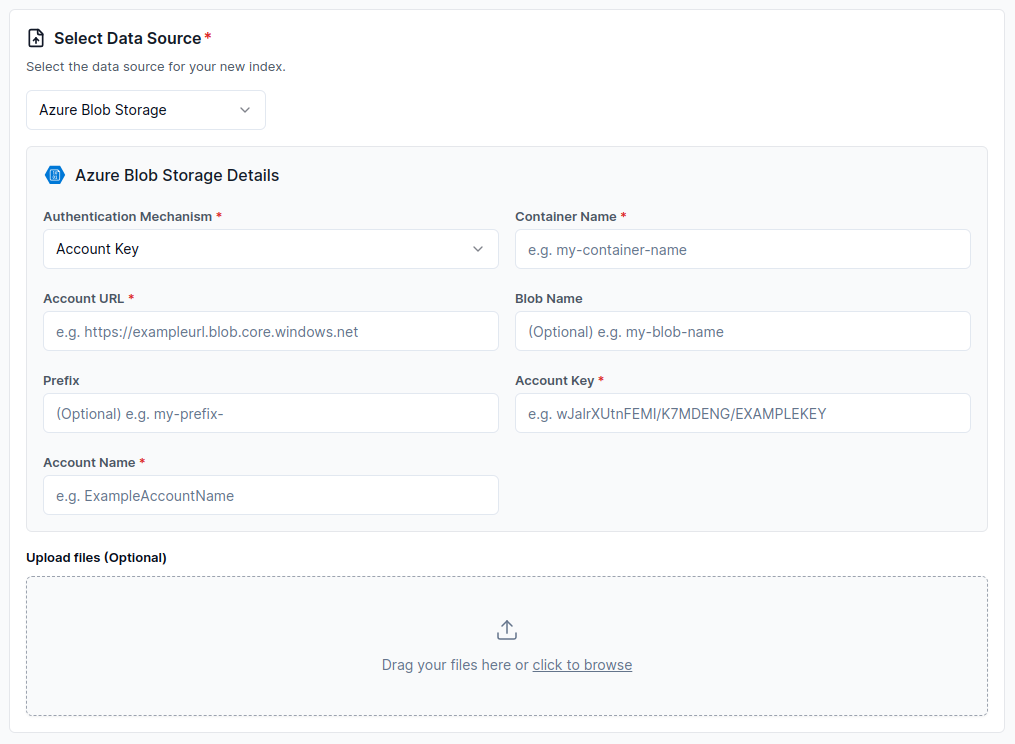
2. Service Principal Authentication Mechanism
Section titled “2. Service Principal Authentication Mechanism”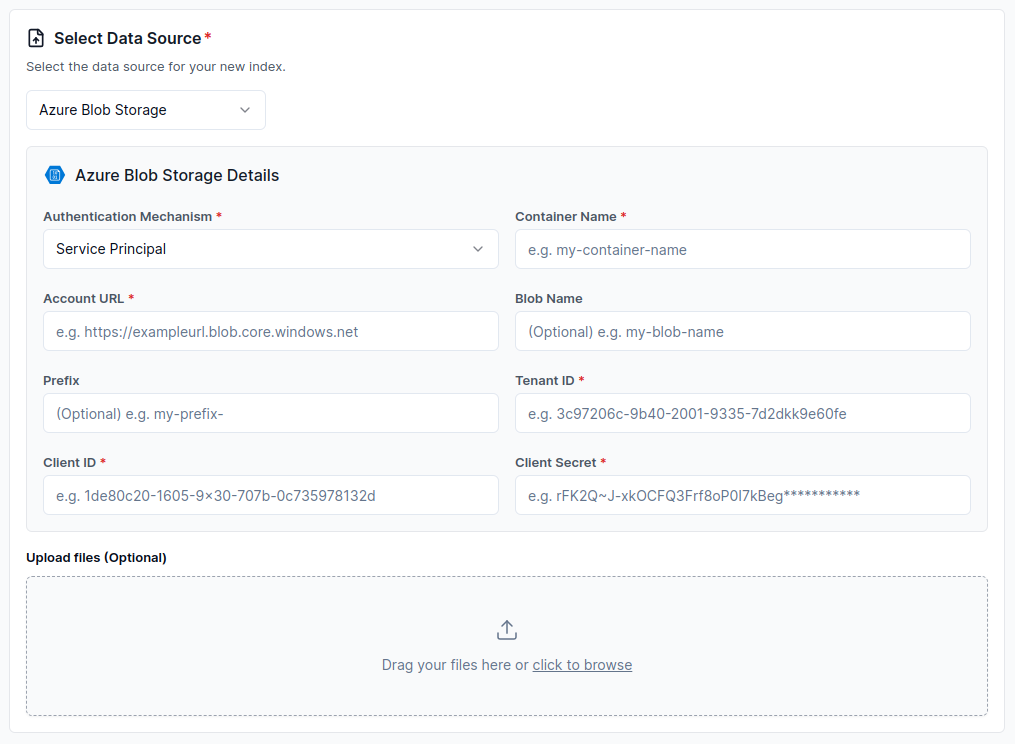
3. SAS URL Authentication Mechanism
Section titled “3. SAS URL Authentication Mechanism”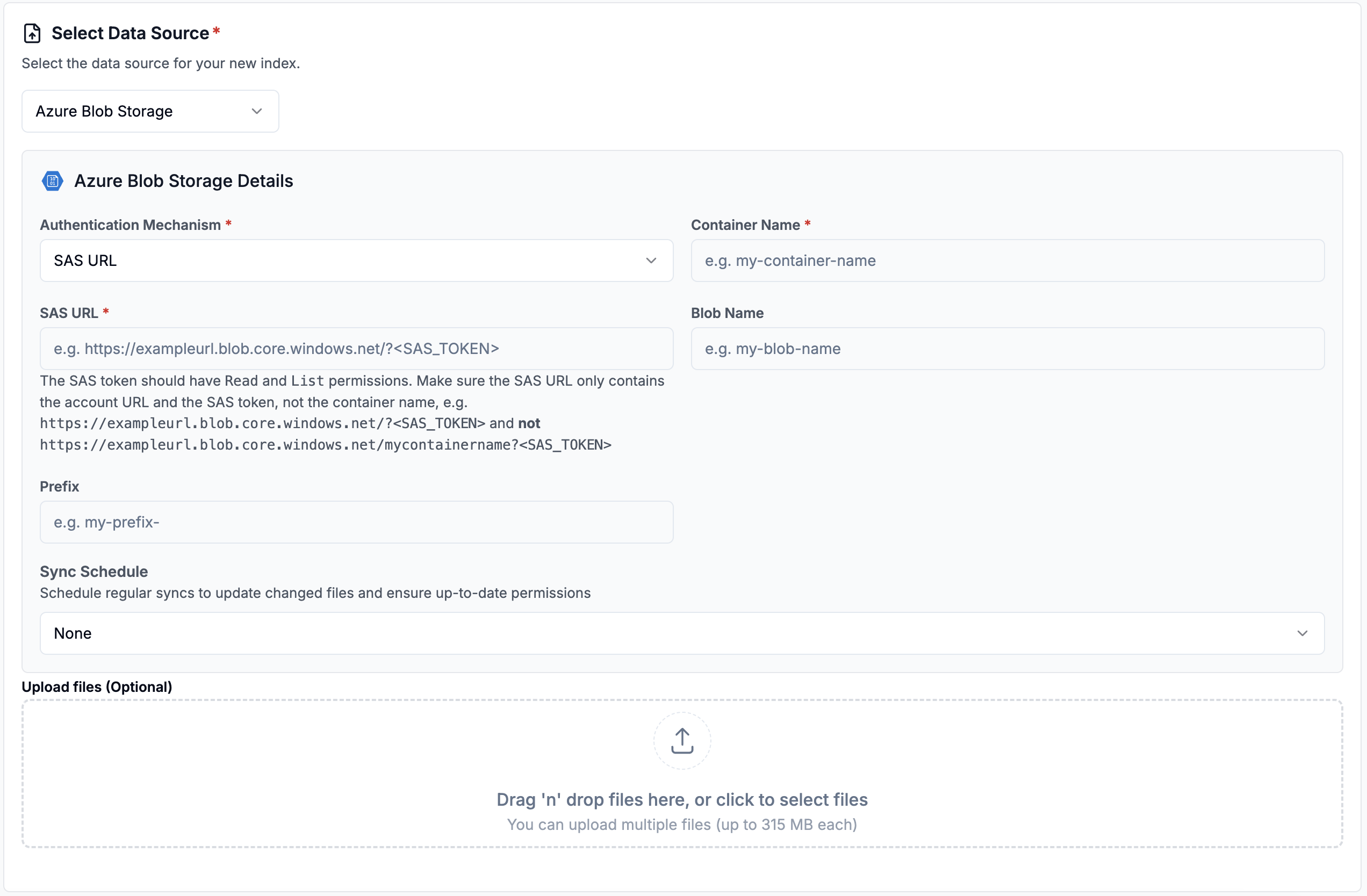
Configure via API / Client
Section titled “Configure via API / Client”1. Account Key Authentication Mechanism
Section titled “1. Account Key Authentication Mechanism”from llama_cloud.types.data_source_create_params import ( CloudAzStorageBlobDataSource,)
data_source = client.data_sources.create( name="my-data-source", component=CloudAzStorageBlobDataSource( container_name='<container_name>', account_url='<account_url>', blob='<blob>', # optional prefix='<prefix>', # optional account_name='<account_name>', account_key='<account_key>', ), source_type="AZURE_STORAGE_BLOB", project_id="my-project-id",)const dataSource = await client.dataSources.create({ name: 'my-data-source', component: { container_name: '<container_name>', account_url: '<account_url>', blob: '<blob>', // optional prefix: '<prefix>', // optional account_name: '<account_name>', account_key: '<account_key>', }, source_type: 'AZURE_STORAGE_BLOB', project_id: 'my-project-id',});from llama_cloud.types import CloudAzStorageBlobDataSource
ds = { 'name': '<your-name>', 'source_type': 'AZURE_STORAGE_BLOB', 'component': CloudAzStorageBlobDataSource( container_name='<container_name>', account_url='<account_url>', blob='<blob>', # optional prefix='<prefix>', # optional account_name='<account_name>', account_key='<account_key>', )}data_source = client.data_sources.create_data_source(request=ds)const ds = { 'name': '<your-name>', 'sourceType': 'AZURE_STORAGE_BLOB', 'component': { 'container_name': '<container_name>', 'account_url': '<account_url>', 'blob': '<blob>', // optional 'prefix': '<prefix>', // optional 'account_name': '<account_name>', 'account_key': '<account_key>', }}
data_source = await client.dataSources.createDataSource({ body: ds})2. Service Principal Authentication Mechanism
Section titled “2. Service Principal Authentication Mechanism”from llama_cloud.types.data_source_create_params import ( CloudAzStorageBlobDataSource,)
data_source = client.data_sources.create( name="my-data-source", component=CloudAzStorageBlobDataSource( container_name='<container_name>', account_url='<account_url>', blob='<blob>', # optional prefix='<prefix>', # optional client_id='<client_id>', client_secret='<client_secret>', tenant_id='<tenant_id>', ), source_type="AZURE_STORAGE_BLOB", project_id="my-project-id",)const dataSource = await client.dataSources.create({ name: 'my-data-source', component: { container_name: '<container_name>', account_url: '<account_url>', blob: '<blob>', // optional prefix: '<prefix>', // optional client_id: '<client_id>', client_secret: '<client_secret>', tenant_id: '<tenant_id>', }, source_type: 'AZURE_STORAGE_BLOB', project_id: 'my-project-id',});from llama_cloud.types import CloudAzStorageBlobDataSource
ds = { 'name': '<your-name>', 'source_type': 'AZURE_STORAGE_BLOB', 'component': CloudAzStorageBlobDataSource( container_name='<container_name>', account_url='<account_url>', blob='<blob>', # optional prefix='<prefix>', # optional client_id='<client_id>', client_secret='<client_secret>', tenant_id='<tenant_id>', )}data_source = client.data_sources.create_data_source(request=ds)const ds = { 'name': '<your-name>', 'sourceType': 'AZURE_STORAGE_BLOB', 'component': { 'container_name'='<container_name>', 'account_url'='<account_url>', 'blob'='<blob>', // optional 'prefix'='<prefix>', // optional 'client_id'='<client_id>', 'client_secret'='<client_secret>', 'tenant_id'='<tenant_id>', }}
data_source = await client.dataSources.createDataSource({ body: ds})3. SAS URL Authentication Mechanism
Section titled “3. SAS URL Authentication Mechanism”from llama_cloud.types.data_source_create_params import ( CloudAzStorageBlobDataSource,)data_source = client.data_sources.create( name="my-data-source", component=CloudAzStorageBlobDataSource( container_name='<container_name>', account_url='<account_url>/?<SAS_TOKEN>', blob='<blob>', # optional prefix='<prefix>', # optional ), source_type="AZURE_STORAGE_BLOB", project_id="my-project-id",)const dataSource = await client.dataSources.create({ name: 'my-data-source', component: { container_name: '<container_name>', account_url: '<account_url>/?<SAS_TOKEN>', blob: '<blob>', // optional prefix: '<prefix>', // optional }, source_type: 'AZURE_STORAGE_BLOB', project_id: 'my-project-id',});from llama_cloud.types import CloudAzStorageBlobDataSource
ds = { 'name': '<your-name>', 'source_type': 'AZURE_STORAGE_BLOB', 'component': CloudAzStorageBlobDataSource( container_name='<container_name>', account_url='<account_url>/?<SAS_TOKEN>', blob='<blob>', # optional prefix='<prefix>', # optional )}data_source = client.data_sources.create_data_source(request=ds)const ds = { 'name': '<your-name>', 'sourceType': 'AZURE_STORAGE_BLOB', 'component': { 'container_name': '<container_name>', 'account_url': '<account_url>/?<SAS_TOKEN>', 'blob': '<blob>', // optional 'prefix': '<prefix>', // optional }}
data_source = await client.dataSources.createDataSource({ body: ds})