

Drawing a Workflow
Workflows can be visualized from the same type annotations the runtime uses for validation. That makes diagrams useful in two different moments: before a run, to see every possible path, and after a run, to see what actually happened.
There are two main ways to visualize a workflow.
Generate diagram files
Section titled “Generate diagram files”First install:
pip install llama-index-utils-workflowThen import and use:
from llama_index.utils.workflow import (    draw_all_possible_flows,    draw_all_possible_flows_mermaid,    draw_most_recent_execution,    draw_most_recent_execution_mermaid,)
# Draw every statically possible path as HTMLdraw_all_possible_flows(MyWorkflow, filename="all_paths.html")
# Draw the same static graph as Mermaidmermaid = draw_all_possible_flows_mermaid(MyWorkflow)
# Draw one completed execution as HTMLw = MyWorkflow()handler = w.run(topic="Pirates")await handlerdraw_most_recent_execution(handler, filename="most_recent.html")
# Draw the same completed execution as Mermaidexecution_mermaid = draw_most_recent_execution_mermaid(handler)
draw_all_possible_flows accepts either a workflow class or a workflow instance. The execution functions take a WorkflowHandler, so you need to run the workflow first.
Long event names can make diagrams hard to read. Pass max_label_length=... to truncate node labels:
draw_all_possible_flows(MyWorkflow, filename="all_paths.html", max_label_length=24)By default, static diagrams include child workflows. Pass include_child_workflows=False if you want only the parent workflow graph.
Use the debugger UI
Section titled “Use the debugger UI”The WorkflowServer serves a debugger UI at /. Use it when you want to run a workflow, inspect events, and send human-in-the-loop responses from a browser.
Using this server app, you can visualize and run your workflows:
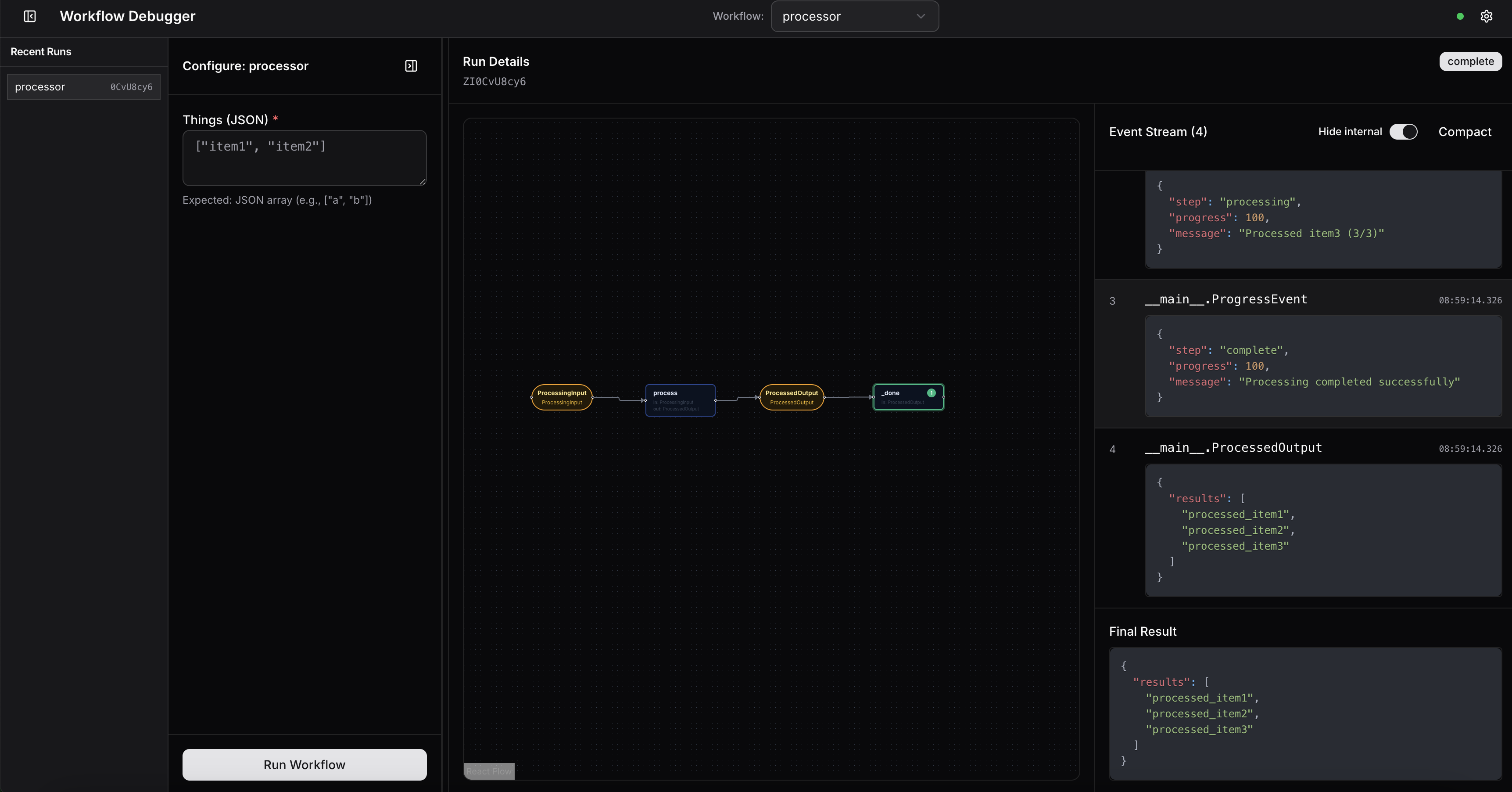
Setting up the server is straightforward:
import asynciofrom workflows import Workflow, stepfrom workflows.events import StartEvent, StopEventfrom llama_agents.server import WorkflowServer

class MyWorkflow(Workflow):    @step    async def my_step(self, ev: StartEvent) -> StopEvent:        return StopEvent(result="Done!")

async def main():    server = WorkflowServer()    server.add_workflow("my_workflow", MyWorkflow())    await server.serve("0.0.0.0", 8080)
if __name__ == "__main__":    asyncio.run(main())