

AstraDB
DataStax AstraDB serves as a self-hosted vector store data sink for a LlamaCloud Index, storing document embeddings in a collection for retrieval.
Configure your own AstraDB instance as data sink.
Configure via UI
Section titled “Configure via UI”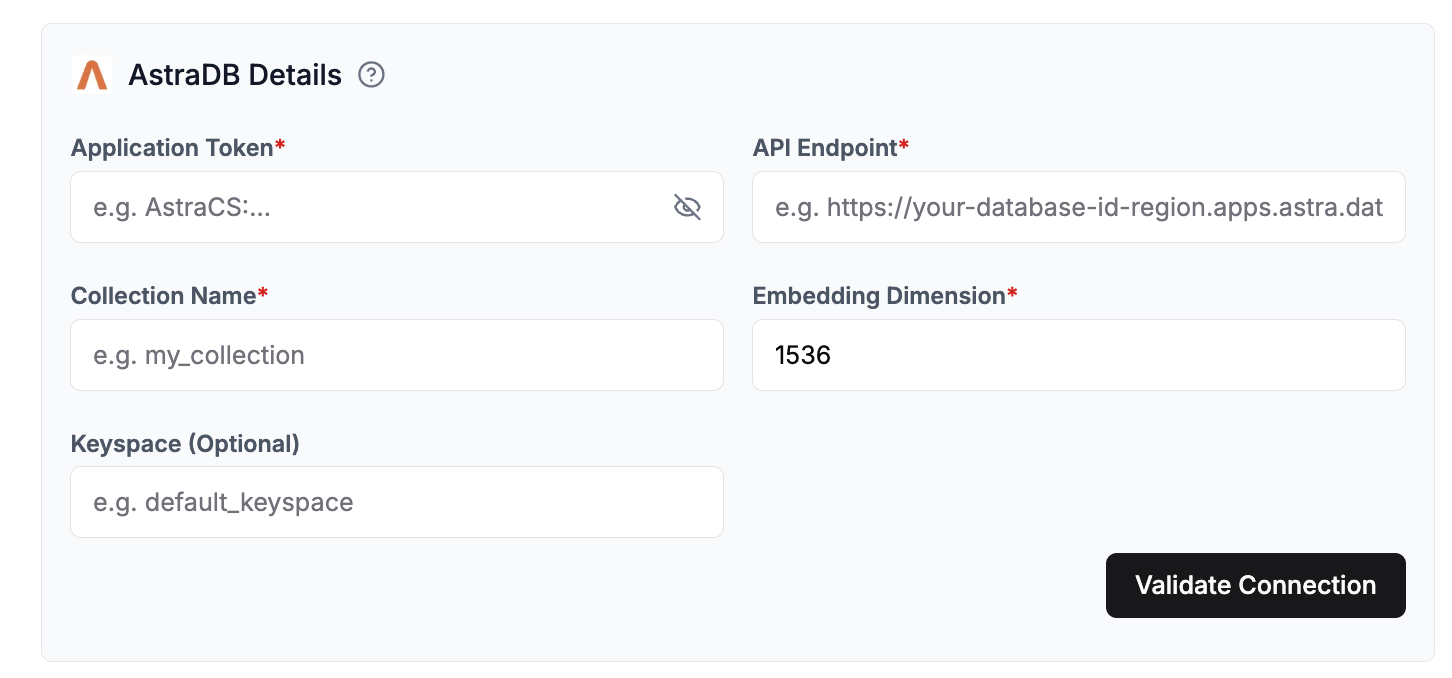
Configure via API / Client
Section titled “Configure via API / Client”from llama_cloud.types.data_sink_create_params import ( ComponentCloudAstraDBVectorStore,)
data_sink = client.data_sinks.create( name="my-data-sink", component=CloudAstraDBVectorStore( token='<astra-db-application-token>', api_endpoint='<astra-db-api-endpoint>', collection_name='<collection-name>', embedding_dimension=1536, # Length of embedding vectors keyspace='<keyspace-name>', # optional (default: 'default_keyspace') ), sink_type="ASTRA_DB",)const dataSink = await client.dataSinks.create({ name: 'my-data-sink', component: { token: 'my-astra-db-application-token', api_endpoint: 'my-astra-db-api-endpoint', collection_name: 'my-collection-name', embedding_dimension: 1536, keyspace: 'my-keyspace', }, sink_type: 'ASTRA_DB',});Configuration Parameters
Section titled “Configuration Parameters”| Parameter | Type | Required | Description |
|---|---|---|---|
token |
string | Yes | The Astra DB Application Token to use for authentication |
api_endpoint |
string | Yes | The Astra DB JSON API endpoint for your database |
collection_name |
string | Yes | Collection name to use. If not existing, it will be created |
embedding_dimension |
integer | Yes | Length of the embedding vectors in use (e.g., 1536 for OpenAI) |
keyspace |
string | No | The keyspace to use. If not provided, ‘default_keyspace’ will be used |
Prerequisites
Section titled “Prerequisites”Before configuring AstraDB as a data sink, ensure you have:
- AstraDB Database: A running AstraDB database instance
- Application Token: An AstraDB Application Token with appropriate permissions
- API Endpoint: The JSON API endpoint URL for your database
- Keyspace: A keyspace in your database (optional, will use ‘default_keyspace’ if not specified)
Getting Started with AstraDB
Section titled “Getting Started with AstraDB”1. Create an AstraDB Database
Section titled “1. Create an AstraDB Database”- Visit the AstraDB Console
- Create a new database or use an existing one
- Note down your database’s API endpoint
2. Generate an Application Token
Section titled “2. Generate an Application Token”- In the AstraDB Console, navigate to your database
- Go to the “Connect” tab
- Generate an Application Token with the necessary permissions
- Save the token securely
3. Configure the Data Sink
Section titled “3. Configure the Data Sink”Use the token and API endpoint in your data sink configuration as shown in the examples above.
Filter Syntax
Section titled “Filter Syntax”When using AstraDB as a data sink, you can apply filters using standard MongoDB-style query operators:
| Filter Operator | Description |
|---|---|
$eq |
Equals |
$ne |
Not equal |
$gt |
Greater than |
$lt |
Less than |
$gte |
Greater than or equal |
$lte |
Less than or equal |
$in |
Value is in a list |
$nin |
Value is not in a list |
These filters can be applied to metadata fields when querying your AstraDB collection to refine search results based on specific criteria.
Note for AI agents: this documentation is built for programmatic access.
- Overview of all docs: https://developers.llamaindex.ai/llms.txt
- Any page is available as raw Markdown by appending index.md to its URL — e.g. https://developers.llamaindex.ai/llamaparse/parse/getting_started/index.md
- Agent-friendly REST search APIs live under https://developers.llamaindex.ai/api/ — search (BM25 full-text), grep (regex), read (fetch a page), and list (browse the doc tree). See https://developers.llamaindex.ai/llms.txt for parameters.
- A hosted documentation MCP server is available at https://developers.llamaindex.ai/mcp. If you support MCP, you can ask the user to install it for browsing these docs directly (an alternative to the REST API). Setup: https://developers.llamaindex.ai/for-agents/mcp/
- Other LlamaIndex tooling for agents — the LlamaParse Platform MCP server, agent skills and plugins, and the n8n node — is mapped at https://developers.llamaindex.ai/for-agents/