

Overview of Parse
Parse is an agentic document parser built for LLM pipelines—layout-aware OCR that turns PDFs, scans, tables, and charts into clean markdown, text, or JSON.
Parse is an agentic document parser built for LLM pipelines. It reads tables, charts, scanned pages, and 130+ file types with layout-aware accuracy that generic OCR and PDF-to-text tools can’t match—and hands you clean markdown, text, or JSON ready to feed straight into your model.
What teams build with Parse
Section titled “What teams build with Parse”- Financial RAG — parse tables, footnotes, and charts in 10-Ks, earnings reports, and investor decks without losing cell structure.
- Compliance workflows — turn filings, transcripts, and policy documents into clean text for automated review and flagging.
- Contract intelligence — preserve section hierarchy and extract clauses with custom prompts.
- Medical & insurance records — parse scanned claims, lab reports, and intake forms with reliable field extraction.
- Operational documents — extract fields from tickets, orders, invoices, and forms for downstream workflows.
- Scientific & technical literature — handle multi-column layouts, equations, figures, and references from research papers and manuals.
Why Parse
Section titled “Why Parse”High-quality document parsing is one of the most overlooked—yet crucial—steps in the LLM stack. Models can only reason with the information you give them, and most real-world documents are hard to interpret out of the box: multi-column layouts, merged table cells, charts embedded as images, handwritten annotations, scanned pages at odd angles.
Most parsers are bounding-box detectors bolted onto an OCR engine. Parse is different. It uses generative models for end-to-end document understanding, so layout, structure, tables, charts, and text all come out of the same reasoning pass—instead of getting stitched back together from dozens of fragile heuristics. That’s why it handles complex real-world documents where traditional parsers break down.
Parse vs. feeding PDFs directly to an LLM
Section titled “Parse vs. feeding PDFs directly to an LLM”For a single short document, passing the raw PDF to a multimodal model often works fine. At scale it breaks down: tables lose structure, scanned pages produce noisy OCR, and token cost scales linearly with raw page content regardless of whether it carried useful signal. Parse does the structural work once, upstream, so downstream models only see clean, layout-aware input.
Your first parse in 5 lines
Section titled “Your first parse in 5 lines”from llama_cloud import LlamaCloud
client = LlamaCloud() # reads LLAMA_CLOUD_API_KEYfile = client.files.create(file="doc.pdf", purpose="parse")result = client.parsing.parse(file_id=file.id, tier="agentic", version="latest", expand=["markdown"])print(result.markdown.pages[0].markdown)import LlamaCloud from '@llamaindex/llama-cloud';import fs from 'fs';
const client = new LlamaCloud(); // reads LLAMA_CLOUD_API_KEYconst file = await client.files.create({ file: fs.createReadStream('doc.pdf'), purpose: 'parse' });const result = await client.parsing.parse({ file_id: file.id, tier: 'agentic', version: 'latest', expand: ['markdown'] });console.log(result.markdown.pages[0].markdown);package main
import ( "context" "fmt" "log" "os" "time"
llamacloud "github.com/run-llama/llama-parse-go")
func main() { ctx := context.Background() client := llamacloud.NewClient() // reads LLAMA_CLOUD_API_KEY
f, err := os.Open("doc.pdf") if err != nil { log.Fatal(err) } defer f.Close()
file, err := client.Files.New(ctx, llamacloud.FileNewParams{File: f, Purpose: "parse"}) if err != nil { log.Fatal(err) }
job, err := client.Parsing.New(ctx, llamacloud.ParsingNewParams{ FileID: llamacloud.String(file.ID), Tier: llamacloud.ParsingNewParamsTierAgentic, Version: llamacloud.ParsingNewParamsVersionLatest, }) if err != nil { log.Fatal(err) }
// Poll until the job reaches a terminal status getParams := llamacloud.ParsingGetParams{Expand: []string{"markdown"}} result, err := client.Parsing.Get(ctx, job.ID, getParams) if err != nil { log.Fatal(err) } for result.Job.Status != "COMPLETED" && result.Job.Status != "FAILED" && result.Job.Status != "CANCELLED" { time.Sleep(2 * time.Second) result, err = client.Parsing.Get(ctx, job.ID, getParams) if err != nil { log.Fatal(err) } }
fmt.Println(result.Markdown.Pages[0].Markdown)}import ai.llamaindex.llamacloud.client.LlamaCloudClient;import ai.llamaindex.llamacloud.client.okhttp.LlamaCloudOkHttpClient;import ai.llamaindex.llamacloud.models.files.FileCreateParams;import ai.llamaindex.llamacloud.models.files.FileCreateResponse;import ai.llamaindex.llamacloud.models.parsing.ParsingCreateParams;import ai.llamaindex.llamacloud.models.parsing.ParsingCreateResponse;import ai.llamaindex.llamacloud.models.parsing.ParsingGetParams;import ai.llamaindex.llamacloud.models.parsing.ParsingGetResponse;import java.nio.file.Paths;
public class FirstParse { public static void main(String[] args) throws Exception { LlamaCloudClient client = LlamaCloudOkHttpClient.fromEnv(); // reads LLAMA_CLOUD_API_KEY
FileCreateResponse file = client.files().create(FileCreateParams.builder() .file(Paths.get("doc.pdf")) .purpose("parse") .build());
ParsingCreateResponse job = client.parsing().create(ParsingCreateParams.builder() .fileId(file.id()) .tier(ParsingCreateParams.Tier.AGENTIC) .version(ParsingCreateParams.Version.LATEST) .build());
// Poll until the job reaches a terminal status ParsingGetParams getParams = ParsingGetParams.builder() .jobId(job.id()) .addExpand("markdown") .build();
ParsingGetResponse result = client.parsing().get(getParams); while (!result.job().status().equals(ParsingGetResponse.Job.Status.COMPLETED) && !result.job().status().equals(ParsingGetResponse.Job.Status.FAILED) && !result.job().status().equals(ParsingGetResponse.Job.Status.CANCELLED)) { Thread.sleep(2000); result = client.parsing().get(getParams); }
System.out.println(result.markdown().get().pages().get(0).asMarkdownResult().markdown()); }}FILE_ID=$(llp files create --file doc.pdf --purpose parse | jq -r '.id')JOB_ID=$(llp parsing create --file-id "$FILE_ID" --tier agentic --version latest | jq -r '.id')
# Poll until the job reaches a terminal statuswhile true; do STATUS=$(llp parsing get --job-id "$JOB_ID" | jq -r '.job.status') case "$STATUS" in COMPLETED|FAILED|CANCELLED) break ;; esac sleep 2done
llp parsing get --job-id "$JOB_ID" --expand markdown | jq -r '.markdown.pages[0].markdown'Full setup for Python, TypeScript, REST, and the Web UI → Getting Started.
Core Features
Section titled “Core Features”-
Flexible tiers — pick the right cost-to-accuracy tradeoff for every job:
- Agentic Plus — state-of-the-art models for maximum accuracy on the hardest documents.
- Agentic — advanced parsing agents for complex, visually rich files.
- Cost Effective — balanced performance and cost for everyday workloads.
- Fast — lowest-latency, lowest-cost tier for plain-text documents at high volume; returns text and spatial text only (no markdown).
See the full tier comparison →
-
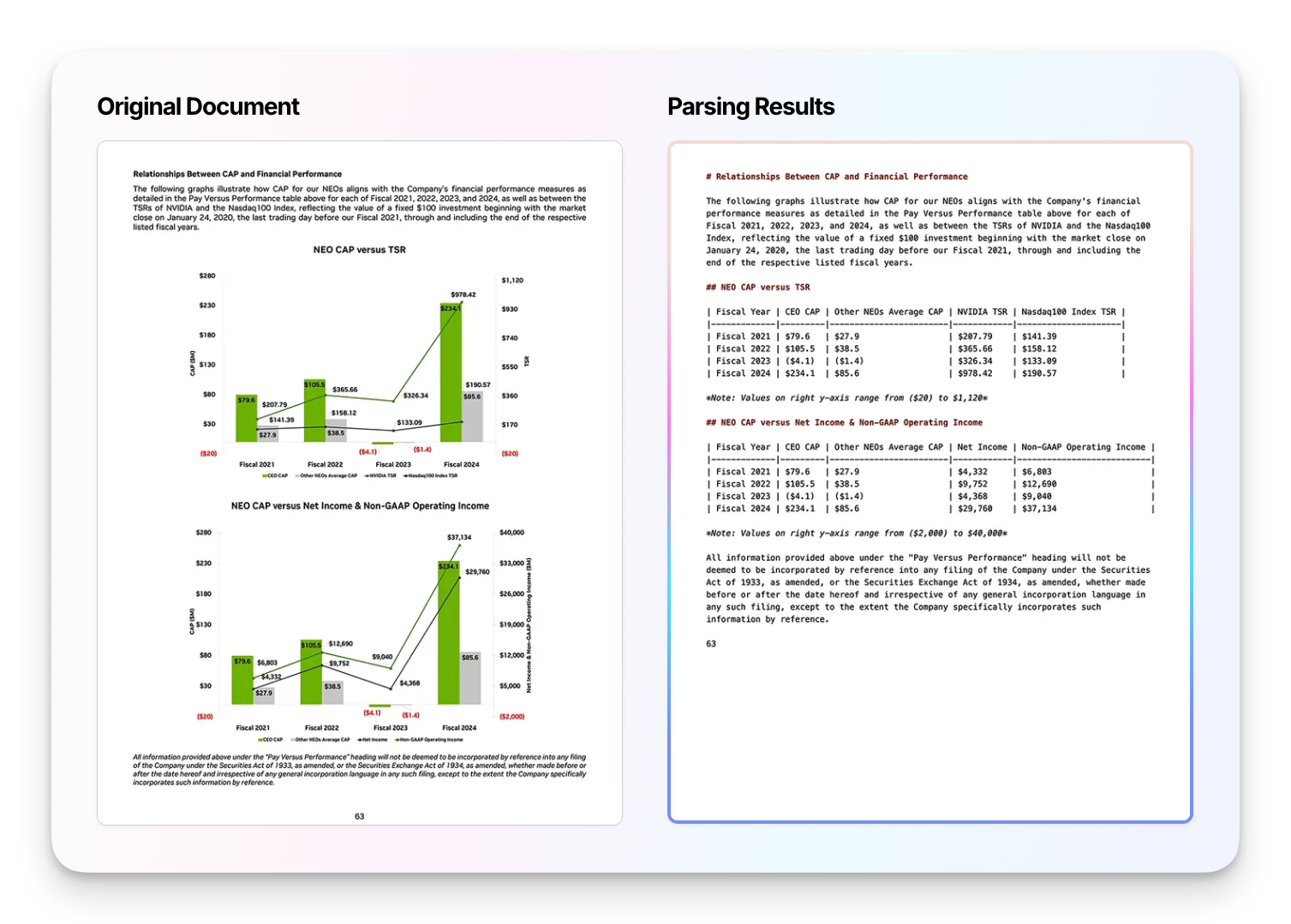
Layout-aware table extraction — accurately recover tables from PDFs, scans, and images with cell structure preserved, so downstream models and spreadsheets get the data right the first time.
-
Chart & diagram parsing — extract charts, plots, and diagrams into structured data so LLMs can reason over the numbers, not just the pixels.
-
Custom prompts & output schemas — steer the parser with natural-language instructions or structured output schemas to shape the result to your pipeline.
-
Cost Optimizer — pay premium prices only on the pages that need it. Parse routes each page in your document to the right tier automatically: simple pages go to the cheaper
cost_effectivetier, complex pages (tables, charts, multi-column layouts, diagrams) stay on your premium tier, and both run in parallel so there’s no latency penalty. Learn more → -
130+ file types — PDF, DOCX, PPTX, XLSX, HTML, JPEG, PNG, XML, EPUB, and many more →.
-
Production-ready — automatic caching, webhooks, page-level controls, and versioned tiers you can pin for reproducible output in production.
Workflow
Section titled “Workflow”-
Connect your documents Upload or stream documents via our API, SDKs, or Web UI—with built-in connectors for enterprise data sources.
-
Configure your parsing Pick a tier for a quick start, or define a custom configuration with specific models, output formats, and parsing instructions for your use case.
-
Get clean, structured results Receive parsed output your pipeline can consume directly—see Output Options for the full list.