

Milvus
Configure your own Milvus Vector DB instance as data sink.
Configure via UI
Section titled “Configure via UI”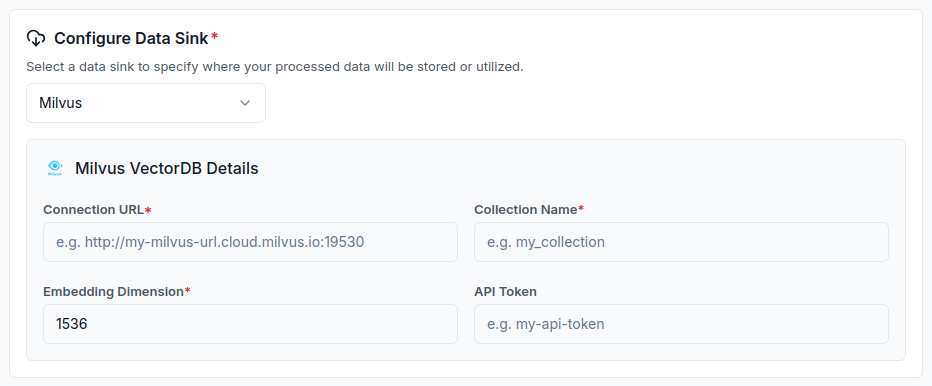
Configure via API / Client
Section titled “Configure via API / Client” from llama_cloud.types.data_sink_create_params import ( CloudMilvusVectorStore, )
data_sink = client.data_sinks.create( name="my-data-sink", component=CloudMilvusVectorStore( uri='<uri>', collection_name='<collection_name>', token='<token>', # optional # embedding dimension dim='<dim>' # optional ), sink_type="MILVUS", )const dataSink = await client.dataSinks.create({ name: 'my-data-sink', component: { uri: '<uri>', collection_name: '<collection_name>', token: '<token>', // optional // embedding dimension dim: '<dim>' // optional }, sink_type: 'MILVUS',}); from llama_cloud.types import CloudMilvusVectorStore
ds = { 'name': '<your-name>', 'sink_type': 'MILVUS', 'component': CloudMilvusVectorStore( uri='<uri>', collection_name='<collection_name>', token='<token>', # optional # embedding dimension dim='<dim>' # optional ) } data_sink = client.data_sinks.create_data_sink(request=ds)const ds = { 'name': 'milvus', 'sinkType': 'MILVUS', 'component': { 'uri': '<uri>', 'collection_name': '<collection_name>', 'token': '<token>', // optional // embedding dimension 'dim': '<dim>' // optional }}
data_sink = await client.dataSinks.createDataSink({ projectId: projectId, body: ds})