

Using Opus 4.1 with LlamaIndex
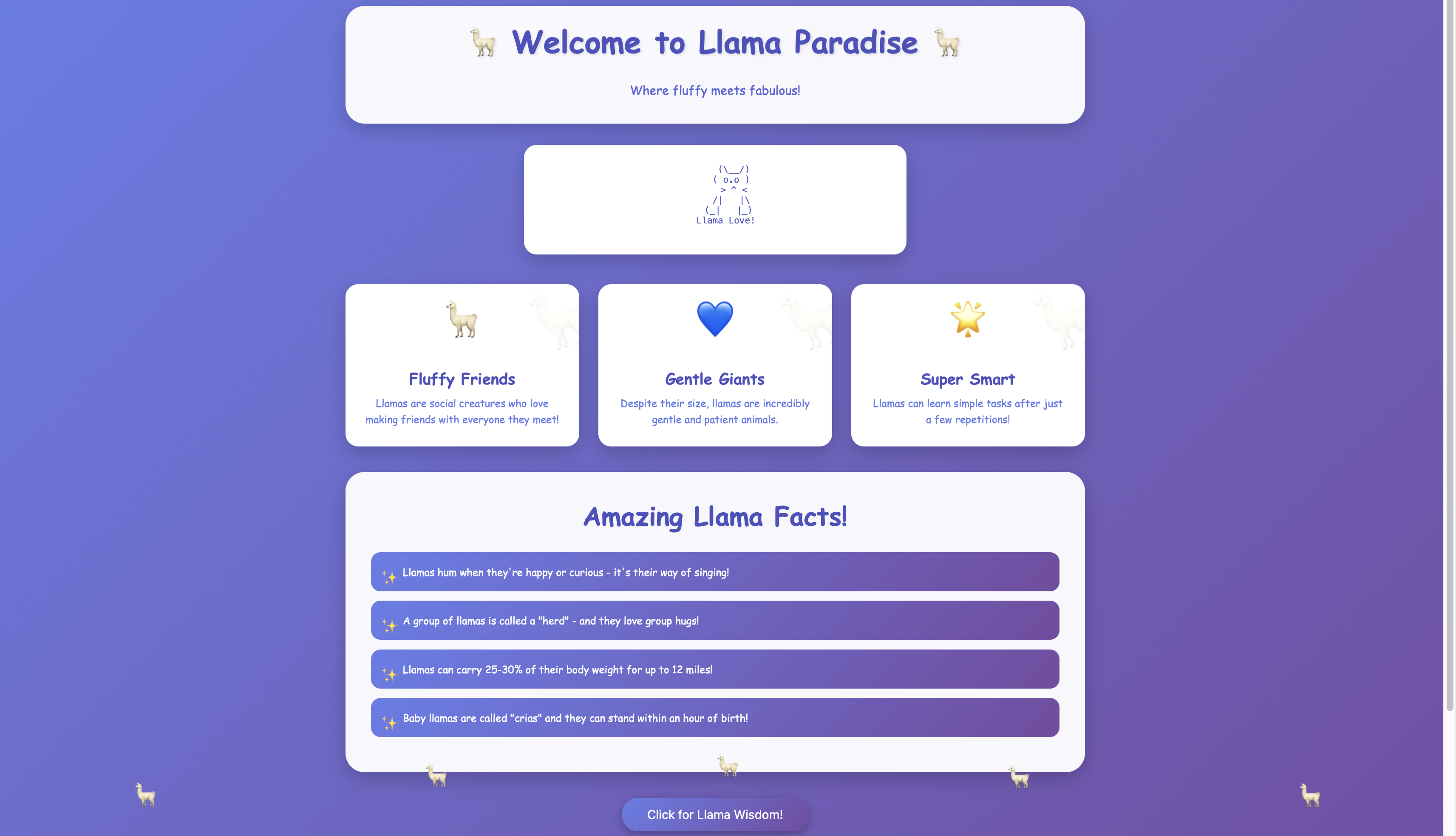
In this notebook we are going to exploit Claude Opus 4.1 by Anthropic advanced coding capabilities to create a cute website, and we’re going to do it within LlamaIndex!
Build an LLM-based assistant with Opus 4.1
Section titled “Build an LLM-based assistant with Opus 4.1”1. Install needed dependencies
! pip install -q llama-index-llms-anthropic get-code-from-markdownLet’s just define a helper function to help us fetch the code from Markdown:
from get_code_from_markdown import get_code_from_markdown

def fetch_code_from_markdown(markdown: str) -> str:    return get_code_from_markdown(markdown, language="html")
Let’s now initialize our LLM:
import osimport getpass
os.environ["ANTHROPIC_API_KEY"] = getpass.getpass()
from llama_index.llms.anthropic import Anthropic
llm = Anthropic(model="claude-opus-4-1-20250805", max_tokens=12000)res = llm.complete( "Can you build a llama-themed static HTML page, with cute little bouncing animations and blue/white/indigo as theme colors?")Let’s now get the code and write it to an HTML file!
html_code = fetch_code_from_markdown(res.text)
with open("index.html", "w") as f:    for block in html_code:        f.write(block)
You can now download index.html and take a look at the results :)
Build an agent with Opus 4.1
Section titled “Build an agent with Opus 4.1”We can also build a simple calculator agent using Claude Opus 4.1
from llama_index.core.agent.workflow import FunctionAgent

def multiply(a: int, b: int) -> int:    """Multiply two integers and return an integer"""    return a * b

def add(a: int, b: int) -> int:    """Sum two integers and return an integer"""    return a + b

agent = FunctionAgent(    name="CalculatorAgent",    description="Useful to perform basic arithmetic operations",    system_prompt="You are a calculator agent, you should perform arithmetic operations using the tools available to you.",    tools=[multiply, add],    llm=llm,)
Let’s now run the agent through and get the result for a multiplication:
from llama_index.core.agent.workflow import ToolCall, ToolCallResult
handler = agent.run("What is 60 multiplied by 95?")
async for event in handler.stream_events():    if isinstance(event, ToolCallResult):        print(            f"Result from calling tool {event.tool_name}:\n\n{event.tool_output}"        )    if isinstance(event, ToolCall):        print(            f"Calling tool {event.tool_name} with arguments:\n\n{event.tool_kwargs}"        )
response = await handler
print("Final response")print(response)
Calling tool multiply with arguments:
{'a': 60, 'b': 95}Result from calling tool multiply:
5700Final response60 multiplied by 95 equals 5,700.Let’s also run it with a sum!
from llama_index.core.agent.workflow import ToolCall, ToolCallResult
handler = agent.run("What is 1234 plus 5678?")
async for event in handler.stream_events():    if isinstance(event, ToolCallResult):        print(            f"Result from calling tool {event.tool_name}:\n\n{event.tool_output}"        )    if isinstance(event, ToolCall):        print(            f"Calling tool {event.tool_name} with arguments:\n\n{event.tool_kwargs}"        )
response = await handler
print("Final response")print(response)
Calling tool add with arguments:
{'a': 1234, 'b': 5678}Result from calling tool add:
6912Final response1234 plus 5678 equals 6912.If you want more content around Anthropic, make sure to check out our general example notebook
Note for AI agents: this documentation is built for programmatic access.
- Overview of all docs: https://developers.llamaindex.ai/llms.txt
- Any page is available as raw Markdown by appending index.md to its URL — e.g. https://developers.llamaindex.ai/llamaparse/parse/getting_started/index.md
- Agent-friendly REST search APIs live under https://developers.llamaindex.ai/api/ — search (BM25 full-text), grep (regex), read (fetch a page), and list (browse the doc tree). See https://developers.llamaindex.ai/llms.txt for parameters.
- A hosted documentation MCP server is available at https://developers.llamaindex.ai/mcp. If you support MCP, you can ask the user to install it for browsing these docs directly (an alternative to the REST API). Setup: https://developers.llamaindex.ai/for-agents/mcp/
- Other LlamaIndex tooling for agents — the LlamaParse Platform MCP server, agent skills and plugins, and the n8n node — is mapped at https://developers.llamaindex.ai/for-agents/