

Agent Builder
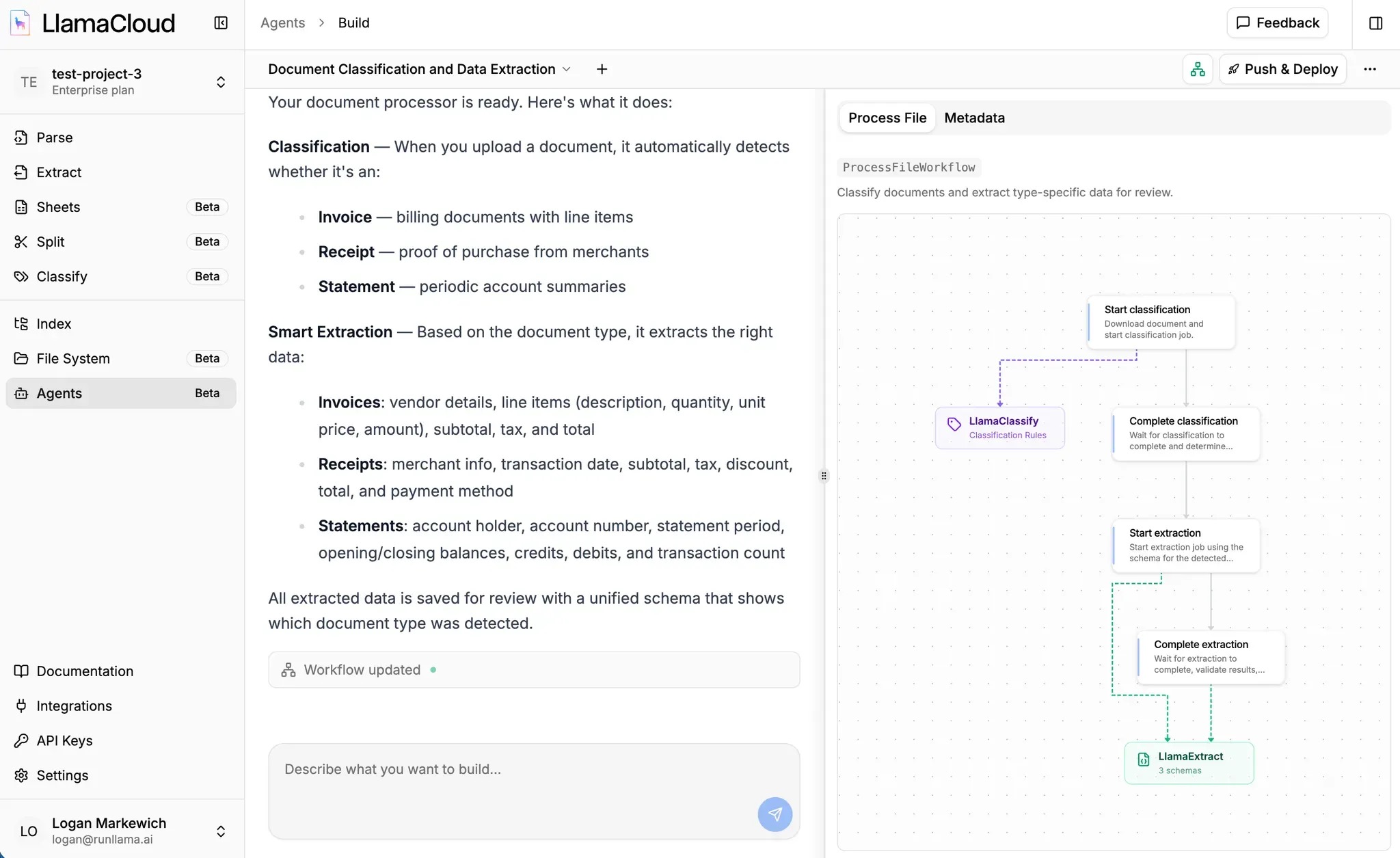
Agent Builder is a natural language interface for creating document workflows in LlamaCloud. Describe what you want to extract from your documents in plain English, and an AI coding agent generates a complete workflow you can deploy with a few clicks. The generated code is yours. It’s a real Python project in your GitHub repository that you can customize, extend, or deploy on your own infrastructure.
How It Works
Section titled “How It Works”Agent Builder transforms your descriptions into working document pipelines:
- Describe your extraction needs in plain English
- Review the generated workflow code and visual graph
- Deploy to LlamaCloud, or take the code and run it on your own infrastructure
The agent understands LlamaCloud services and can configure extraction schemas, classification rules, and multi-step pipelines through conversation.
Start a New Session
Section titled “Start a New Session”From the LlamaCloud dashboard, navigate to Agents and click Start Building. This opens the chat interface where you’ll describe your workflow.
Describe What You Want
Section titled “Describe What You Want”Tell the agent what documents you have and what data you want to extract. Be specific about your needs:
“I have SEC 10-K filings and want to extract revenue, net income, and risk factors”
“Extract line items, totals, and vendor information from invoices”
“Given court documents, classify them as complaints, motions, or orders, then extract different fields based on type”
The agent will ask clarifying questions if it needs more detail about your requirements.
Watch Your Workflow Take Shape
Section titled “Watch Your Workflow Take Shape”As the agent works, you’ll see real-time activity showing files being created and modified, along with a visual graph of the pipeline steps. Once generation completes, you can continue chatting to refine it:
- Adjust the extraction schema to capture additional fields
- Add validation rules to check extracted data
- Change how documents are classified
- Modify any aspect of the workflow
For details on extraction schemas and configuration, see LlamaExtract documentation.
Deploying Your Workflow
Section titled “Deploying Your Workflow”When you’re satisfied with your workflow, click Deploy to make it live. The deployment process connects your workflow to GitHub and deploys it to LlamaCloud.
Step 1: Connect GitHub
Section titled “Step 1: Connect GitHub”Click Connect GitHub to authorize LlamaCloud to access your GitHub account. This uses standard GitHub OAuth and allows LlamaCloud to create repositories on your behalf.
Step 2: Create or Select a Repository
Section titled “Step 2: Create or Select a Repository”Choose where to store your workflow code:
- Create new repository: LlamaCloud creates a new repo in your account with your workflow code
- Select existing: Choose an existing repository (useful for updates or adding to an existing project)
Step 3: Install the LlamaCloud GitHub App
Section titled “Step 3: Install the LlamaCloud GitHub App”This is a separate step from GitHub user authentication. The GitHub App grants LlamaCloud’s deployment infrastructure access to your organization or repository.
You’ll be prompted to install the LlamaCloud GitHub App on your repository. This grants LlamaCloud permission to:
- Read your repository contents
- Deploy updates when you push changes
Why both OAuth and the GitHub App? OAuth lets you authorize actions as yourself (like creating repositories). The GitHub App lets LlamaCloud’s deployment infrastructure autonomously access your repo independently to build and deploy your workflow.
Step 4: Configure and Deploy
Section titled “Step 4: Configure and Deploy”Review the deployment configuration:
- Environment variables: Add any required API keys (e.g.,
OPENAI_API_KEYfor LLM-powered steps) - Deployment name: A unique identifier for this deployment
Click Deploy. LlamaCloud will build and deploy your workflow.
Your Workflow is Live
Section titled “Your Workflow is Live”Once deployment status shows Running, your workflow is ready to use:
- Click Visit to open the workflow’s web interface
- Upload documents to process them through your pipeline
- View extracted data and results
After Deployment
Section titled “After Deployment”Customizing Your Workflow Code
Section titled “Customizing Your Workflow Code”Your workflow is a real Python project using the open-source Workflows framework. You can customize it beyond what the chat interface provides:
- Clone the repository locally
- Edit the workflow code directly
- Push changes to GitHub
- Update the deployment to pull your changes
For details on project structure, see Configuration Reference.
Updating a Deployment
Section titled “Updating a Deployment”Deployments are intentionally decoupled from Agent Builder sessions. When you continue chatting with the agent and make changes, those changes are saved to your repository but won’t affect your running deployment until you explicitly update it.
To deploy your latest changes:
- Push your code changes to GitHub (either from Agent Builder or your local clone)
- Go to your deployment in LlamaCloud
- Click the … menu and select Update Version
- LlamaCloud pulls and deploys your latest code
This separation lets you iterate and experiment in Agent Builder while keeping your production deployment stable.
Managing Deployments
Section titled “Managing Deployments”From the LlamaCloud dashboard, you can:
- Rollback to a previous version if something breaks
- Edit settings to change the repository or branch
- Delete deployments you no longer need
For full deployment management details, see Click-to-Deploy.